Ace Racer
Ace Racer: Arcade Racing with Ultimate Skills
Ace Racer is a mobile racing game from NetEase Games that pairs head-to-head speed with a unique ultimate skill on every car. You can collect licensed cars as well as futuristic concept cars and tune them to your own style. This page is for topping up Ace Racer Tokens with just your User ID and server, without logging in.
What You Can Buy
Tokens are Ace Racer’s premium currency. They buy cars in the shop, entries to exclusive item draws, and tuning parts and cosmetics. Every pack on ItemGame already includes bonus Tokens in its name:
- 60 + 5 Tokens
- 250 + 20 Tokens
- 680 + 60 Tokens
- 1180 + 120 Tokens
- 2880 + 300 Tokens
- 5880 + 650 Tokens
The number after the plus sign is the bonus, delivered together with the main pack.
How to Top Up Ace Racer at ItemGame
- Choose a Tokens pack.
- Enter your Ace Racer User ID.
- Pick the server that matches your account: Japan, Korea, Asia, North America or Europe.
- Choose a payment method and pay. The Tokens are delivered automatically once the payment is confirmed, usually within minutes.
How to Find Your User ID and Server
- Open Ace Racer and go to the main screen.
- Tap the Settings (gear) icon in the top-right corner.
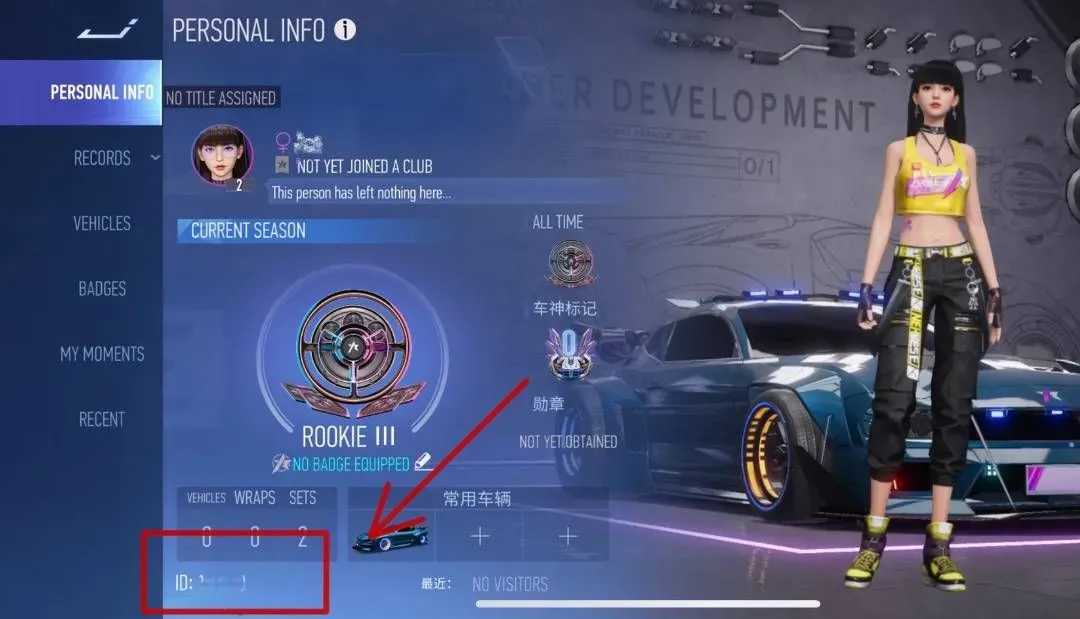
- In the profile section, your User ID is shown under your profile picture.
- In the same menu, note your account’s server. It must match the server you pick at ItemGame.
Tips
- Picking the wrong server is the most common reason Tokens do not arrive. Check it in the game settings before you pay.
- Copy the User ID from the game if you can, instead of typing it.
- Choose a pack that fits what you plan to buy, such as one draw or a specific car.
- Keep your invoice number until the Tokens show in your balance.
Why Top Up at ItemGame
- Automatic processing: most orders are delivered within minutes of payment confirmation
- Prices in your local currency, with the final total shown before you pay
- Pay with the QR, e-wallet and bank options available in your country, through licensed payment partners
- Only the account details the order form asks for, never your game password
- Support over WhatsApp and email with your invoice number
How to find your Ace Racer User ID and server:
- Open Ace Racer and go to the main screen.
- Tap the Settings (gear) icon in the top-right corner.
- In the profile section, your User ID is shown under your profile picture. Copy the number carefully.
- In the same menu, note your account’s server (Japan, Korea, Asia, North America or Europe).
- Enter the User ID at ItemGame and pick the same server from the list.
A wrong server is the most common reason Tokens do not arrive, so check both before you pay.