







Top Up PUBG Mobile Lite BC with User ID
About PUBG Mobile Lite
PUBG Mobile Lite is a lighter version of PUBG Mobile designed for phones with modest specs. The game is smaller, maps are more compact and there are fewer players per match, so games move faster without losing the battle royale feel. BC (Battle Coins) is the premium currency for the Winner Pass, crates and shop items.
What You Can Buy
PUBG Mobile Lite is sold as BC (Battle Coins) packs, most with a bonus included: 30 BC, 60 + 36 Bonus BC, 170 + 102 Bonus BC, 610 + 366 Bonus BC, 1550 + 930 Bonus BC, 3250 + 1950 Bonus BC and 6680 + 4008 Bonus BC. The first number is the main BC and the second is the bonus delivered in the same transaction.
How to Top Up PUBG Mobile Lite on ItemGame
- Enter the User ID of your PUBG Mobile Lite account.
- Choose the item you want.
- Pay with the local e-wallets, QR and bank options available in your country.
- After the payment is confirmed, the order is processed automatically and delivered to your account.
How to Find Your User ID
Open PUBG Mobile Lite and go to the lobby. Tap your profile name in the top-right corner; the Data panel opens with your ID on the top line (ID: a number), next to a copy icon. Copy it into the User ID field on ItemGame.
Tips
- This page is only for PUBG Mobile Lite. For regular PUBG Mobile (UC), use the PUBG Mobile page, because the accounts are separate.
- Check your User ID twice; BC delivered to another account cannot be moved back.
- Match the amount to the Winner Pass or crate you want.
- Keep your invoice number until the item shows up in your account.
- If nothing has arrived after a few minutes, check your invoice page, then contact support with your invoice number.
Why Top Up at ItemGame
- Automatic Process
- No Password Needed
- Local Payments
- Customer Support
To find your PUBG Mobile Lite User ID:
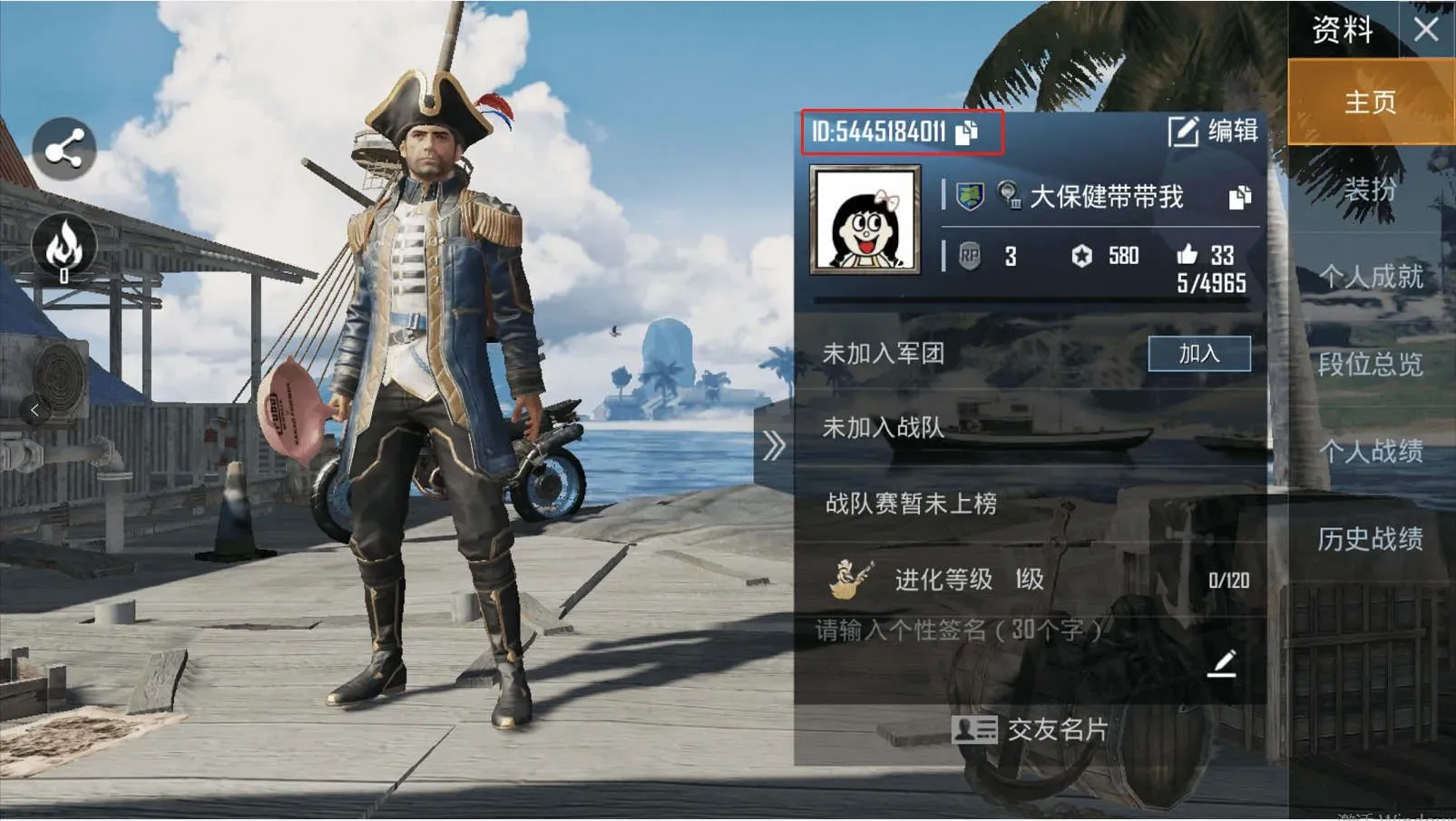
- Open the game and go to the lobby.
- Tap your avatar in the top-left corner.
- Copy the character ID under your profile.
- Paste it into ItemGame.