Top Up Magic Chess: Go Go Diamonds Philippines
Magic Chess: Go Go for Philippines Server Accounts
This page is only for Magic Chess: Go Go accounts on the Philippines (PH) server. Items bought here cannot be delivered to accounts on other servers.
Magic Chess: Go Go is Moonton’s standalone auto-battler: you draft heroes, place them on the board and let them fight round by round. It is a separate app from the Magic Chess mode inside Mobile Legends, so it uses its own User ID and Zone ID. Diamonds are its premium currency, used for Little Commanders, board themes, effects and other cosmetics.
What You Can Buy
Diamond packs and other items for Philippines server accounts. The items currently available are listed on this page; if the list is empty, the product is temporarily unavailable.
How to Top Up
- Enter your User ID and Zone ID from the Magic Chess: Go Go app.
- Choose an item from the list.
- Pay with one of the methods shown at checkout. The list depends on the store you shop in: in Indonesia you pay in rupiah with QRIS, e-wallets, bank virtual accounts or retail outlets, among others. In the Philippines the options include Maya and over-the-counter payment at partner banks, pawnshops and retail outlets.
- After the payment is confirmed, the order is processed automatically.
How to Find Your User ID and Zone ID
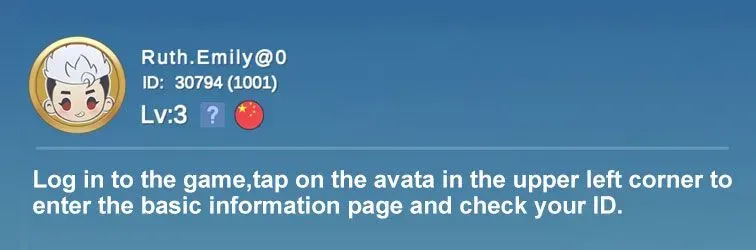
Tap your profile avatar in the top-left corner. Under your nickname you will see the User ID followed by the Zone ID in brackets, for example 12345678(1234).
Tips
- Confirm your account is on the Philippines server.
- Use the IDs from Magic Chess: Go Go, not from Mobile Legends.
- Double-check both numbers before paying.
Why Top Up at ItemGame
- Automatic Process
- No Password Needed
- Local Payments
- Customer Support
To find your Magic Chess: Go Go IDs:
- Open Magic Chess: Go Go and go to the main menu.
- Tap your profile avatar in the top-left corner.
- Read the numbers under your nickname, for example 12345678(1234).
- Enter the first number as User ID and the number in brackets as Zone ID.