Heaven Burns Red
About Heaven Burns Red
Heaven Burns Red is a mobile JRPG from WFS and Key, with a scenario by Jun Maeda, the writer behind Clannad and Angel Beats!. It is set in a future where humanity is close to extinction because of mysterious creatures called Cancers, and the last hope rests on girls wielding Seraph weapons. You follow Ruka Kayamori and Squad 31A through a visual novel style story full of funny and moving moments, mixed with turn-based battles.
What You Can Buy
The items are Paid Quartz packs from 130 up to 10000 Paid Quartz (130, 410, 870, 1370, 2720, 4750 and 10000). Quartz is the premium currency, mainly used for character and style gacha and some other purchases. Paid Quartz is the purchased kind, which the game keeps separate from free Quartz earned as rewards and which can be used for special offers that require paid Quartz. Choose an amount that fits the gacha round you are aiming for.
How to Top Up Heaven Burns Red on ItemGame
- Enter the User ID of your Heaven Burns Red account.
- Choose the item you want.
- Pay with the local e-wallets, QR and bank options available in your country.
- After the payment is confirmed, the order is processed automatically and delivered to your account.
How to Find Your User ID
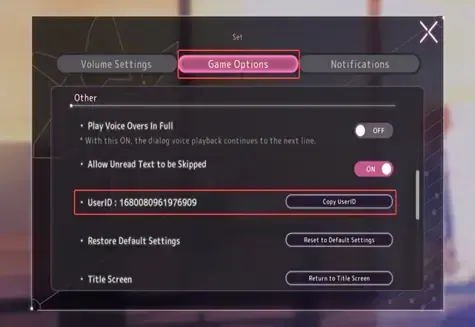
Log in to the game, open the Set (settings) menu and choose the Game settings section. Your User ID is shown there. Copy it without spaces and paste it into the User ID field on ItemGame.
Tips
- Check your User ID twice before paying; Quartz delivered to another account cannot be moved back.
- Copy the User ID from the settings menu, not your player name.
- Choose an amount that matches the gacha you are saving for.
- Keep your invoice number until the item shows up in your account.
- If nothing has arrived after a few minutes, check your invoice page, then contact support with your invoice number.
Why Top Up at ItemGame
- Automatic processing: most orders are delivered within minutes of payment confirmation
- Prices in your local currency, with the final total shown before you pay
- Pay with the QR, e-wallet and bank options available in your country, through licensed payment partners
- Only the account details the order form asks for, never your game password
- Support over WhatsApp and email with your invoice number
To find your Heaven Burns Red User ID:
- Log in to the game.
- Open the Set menu.
- Choose the Game settings section.
- Copy the User ID into ItemGame.