Buy Spotify Gift Card 30 USD for Premium
About Spotify Gift Card
Spotify is the world’s most popular music and podcast streaming service. With Spotify Premium, you can listen without ads, download songs to play offline and play any song you like. A Spotify Gift Card is a prepaid code that you redeem on your Spotify account to pay for a Premium subscription, so you do not need to link a card to your account. This page is for Spotify users who want to buy a gift card using local payment methods.
What You Can Buy
The item on offer is the Spotify Gift Card 30 USD, in the Gift Card category. Once the payment is confirmed, the gift card code is sent to your invoice page or order history. You redeem the code on your Spotify account and the balance is used for a Premium subscription, either to upgrade a free account to Premium or to extend an existing subscription.
Because this gift card is in USD, make sure the country registered on your Spotify account matches the gift card’s currency before you buy, as Spotify generally only accepts gift cards that match the account’s country.
How to Buy a Spotify Gift Card on ItemGame
- Choose the Spotify Gift Card 30 USD from the item list.
- Fill in the contact details requested so the code can be sent to you and viewed again in your order history.
- Choose a payment method, such as QRIS, e-wallets, bank virtual account or retail outlets (Alfamart/Indomaret).
- Complete the payment. The gift card code appears on your invoice page once the payment is confirmed.
How to Redeem the Gift Card Code
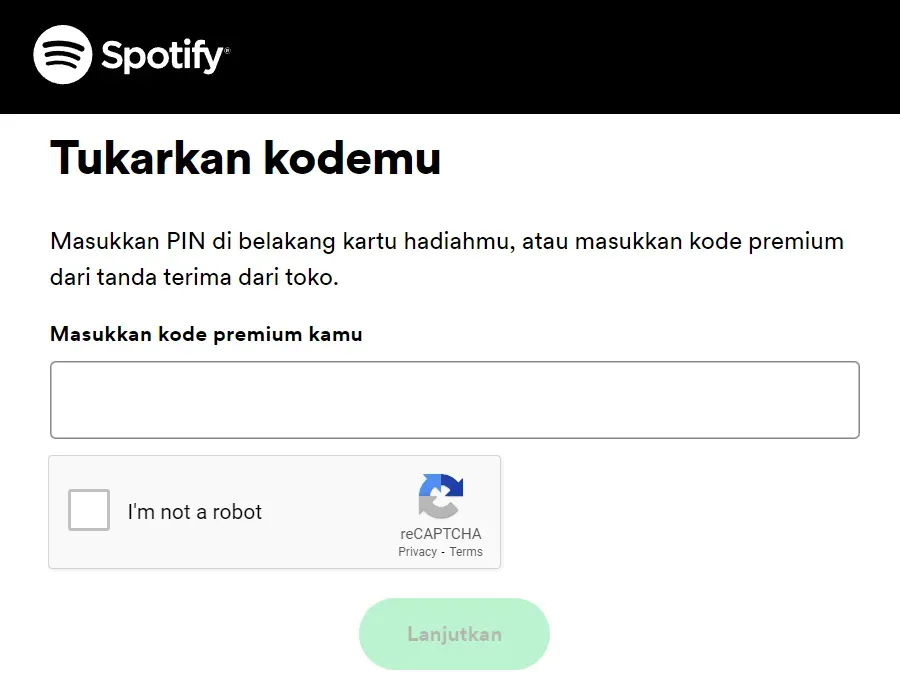
Open Spotify’s redeem page in a web browser at spotify.com/redeem, then log in to your Spotify account. Enter the gift card code from ItemGame and confirm. Redemption is done through a browser, not from inside the Spotify mobile app. Once it succeeds, the balance is used automatically for your Premium subscription.
Tips
- Check your Spotify account’s country before buying so the USD gift card can be redeemed.
- Copy and paste the code when redeeming to avoid typos.
- Make sure you are logged in to the right Spotify account before redeeming; balance added to another account cannot be moved.
- Do not share the code with anyone before you redeem it.
- If the code cannot be redeemed, check your transaction history, then contact support with your invoice number.
Once the code is redeemed, you can enjoy ad-free Spotify Premium right away.
Why Top Up at ItemGame
- Automatic Process
- No Password Needed
- Local Payments
- Customer Support
How to redeem a Spotify Gift Card:
- Once your payment on ItemGame is confirmed, open the invoice page or your order history and copy the gift card code shown there.
- Open a web browser and go to spotify.com/redeem. Redemption is done through a browser, not from inside the Spotify mobile app.
- Log in to the Spotify account you want to add the balance to. Make sure the account’s country matches the gift card’s currency.
- Paste the gift card code into the field provided, then confirm.
- Once it succeeds, the balance is used automatically for a Spotify Premium subscription on that account.
Copy and paste the code to avoid typos, do not share it with anyone before redeeming, and keep your invoice number until the redemption succeeds.