Vidio
About Vidio
Vidio is an Indonesian video streaming service with live sports, national TV channels, films, Asian series and Vidio Original Series. With a subscription package, you can access premium content according to the package you choose. On ItemGame, Vidio packages are activated directly on your Vidio account: you just enter your registered email or phone number, no password needed. It’s a handy option if you’d rather pay with QRIS, an e-wallet or a bank virtual account.
What You Can Buy
Vidio packages on ItemGame come in four tiers, each with a choice of 30 Hari (30 days), 3 Bulan (3 months) and 1 Tahun (1 year):
- Platinum: Platinum 30 Hari, Platinum 3 Bulan, Platinum 1 Tahun.
- Platinum Extra: Platinum Extra 30 Hari, Platinum Extra 3 Bulan, Platinum Extra 1 Tahun.
- Ultimate Mobile: Ultimate Mobile 30 Hari, Ultimate Mobile 3 Bulan, Ultimate Mobile 1 Tahun.
- Ultimate All Screen: Ultimate All Screen 30 Hari, Ultimate All Screen 3 Bulan, Ultimate All Screen 1 Tahun.
The tiers differ in content coverage and the devices you can use: Mobile packages are for watching on your phone, while All Screen covers more types of devices. Check the details of each package in the Vidio app before you choose.
How to Subscribe to Vidio on ItemGame
- Enter the email or phone number registered to your Vidio account in the field provided.
- Choose your package and duration: Platinum, Platinum Extra, Ultimate Mobile or Ultimate All Screen.
- Choose a payment method, such as QRIS, e-wallets (DANA, OVO, ShopeePay, LinkAja), a bank virtual account or cash at Alfamart or Indomaret, and complete the payment following the instructions on the transaction page.
- Once the payment is confirmed, the package is processed automatically and activated on that Vidio account. Check your subscription status in the app.
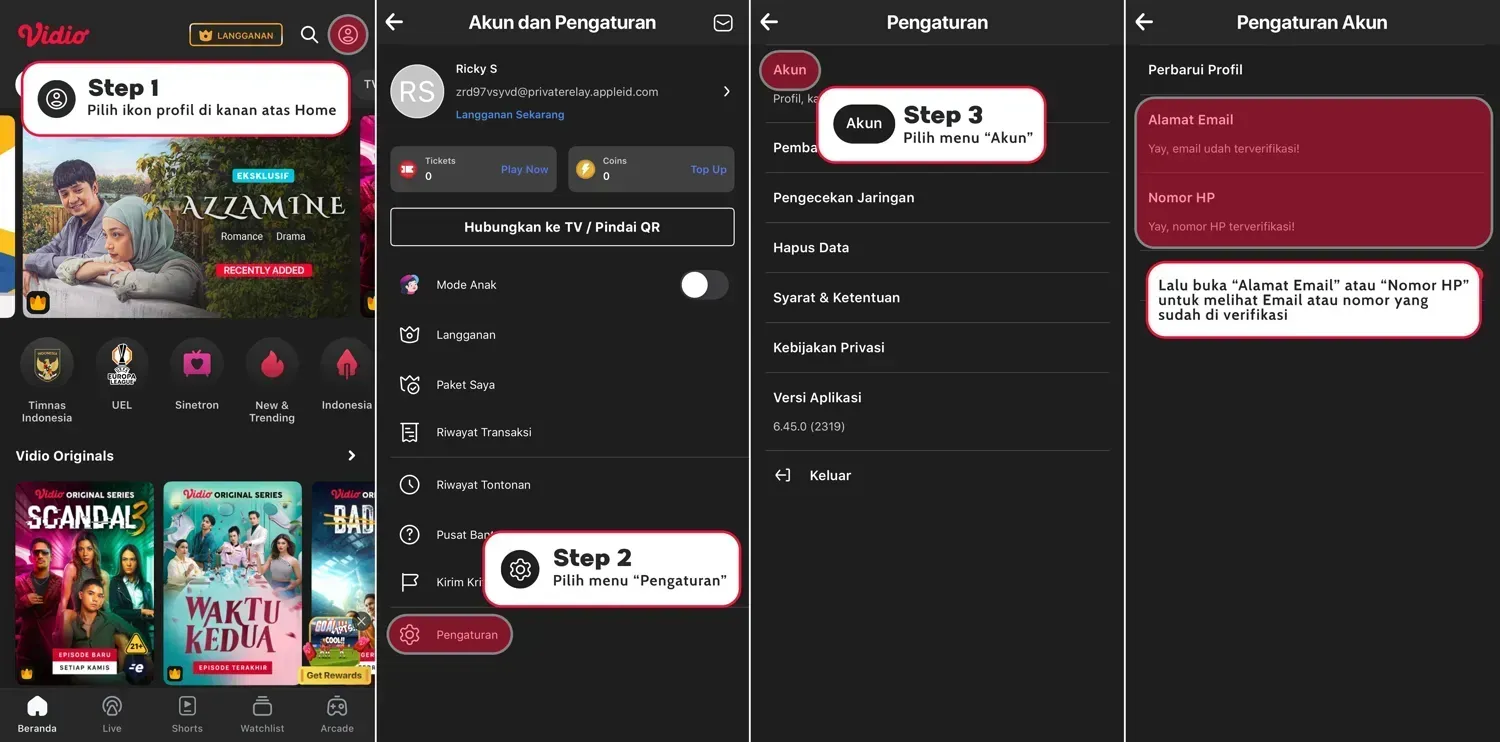
How to Find Your Registered Email or Phone Number
- Open the Vidio app and log in to your account.
- On the Home menu, tap the three-line icon at the top right.
- Go to Settings, then choose Account.
- Your registered email or phone number is shown there. Copy it exactly as shown into the field on ItemGame.
Tips
- Enter your email or phone number exactly as registered on Vidio; the package is activated on that account and can’t be transferred.
- Make sure your Vidio account is already registered before buying, because activation needs an existing account.
- Pick a duration that suits you, for example 30 Hari to try it out or 1 Tahun if you watch regularly.
- Keep your invoice number until the package shows as active in the app.
- If the package isn’t active after a few minutes, check the invoice page, then contact ItemGame support with your invoice number.
Activation runs automatically 24/7, so you can start watching your favorite match or series without a long wait.
Why Top Up at ItemGame
- Automatic processing: most orders are delivered within minutes of payment confirmation
- Prices in your local currency, with the final total shown before you pay
- Pay with the QR, e-wallet and bank options available in your country, through licensed payment partners
- Only the account details the order form asks for, never your game password
- Support over WhatsApp and email with your invoice number
How to check the email or phone number registered to your Vidio account before buying a package on ItemGame:
- Open the Vidio app and log in to the account you want to activate the package on.
- On the Home menu, tap the three-line icon at the top right.
- Go to Settings, then choose Account.
- Look for the registered email or phone number on that page.
- Copy it exactly as shown into the field on ItemGame, without extra spaces. For a phone number, use the same format that appears on your account.
The package is activated on the account matching the details you entered and can’t be transferred, so check again before paying. Make sure your Vidio account is already registered before you buy.