
Tips

Bigo Live is a social live streaming platform where people broadcast chats, talent shows, gaming and interactive sessions for viewers around the world. Features such as multi-guest rooms and PK battles between hosts keep things lively, and viewers show support by sending virtual gifts. Gifts and premium features are paid for with Diamonds, and this page is where you top them up.
Every item on this page is Bigo Live Diamonds, in a wide range: 25 and 50 Diamonds for small gifts, mid-range amounts such as 500, 1000 and 5000 Diamonds for active viewers, and large packs up to 50000 Diamonds for supporters who prefer one big top-up. In the app, Diamonds are used to buy and send virtual gifts to hosts, support hosts during PK battles and buy memberships or special items.
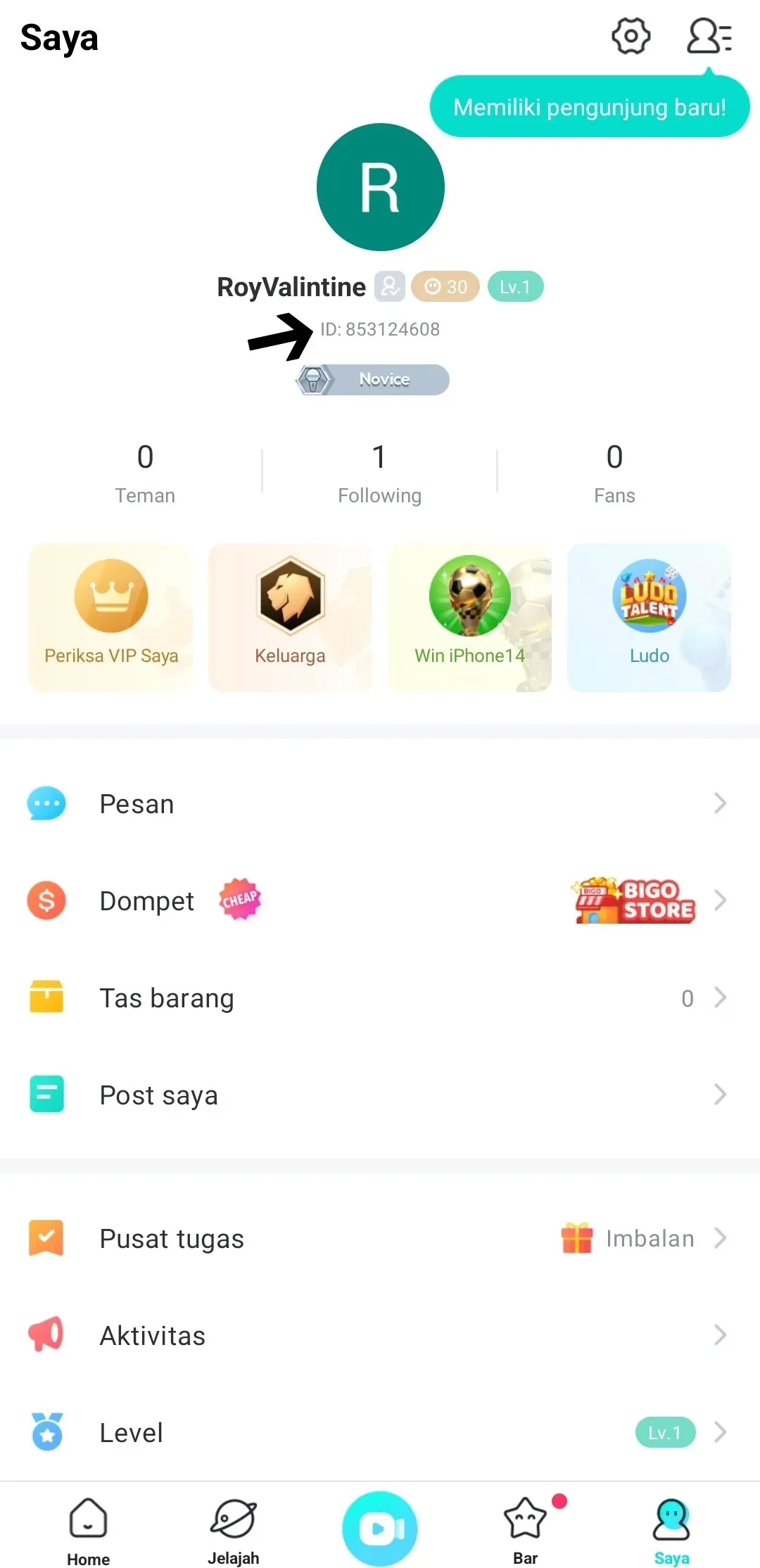
Open Bigo Live and tap the Me tab in the bottom-right corner. On your profile page, your Bigo ID is the number shown under your photo and profile name. Tap it to copy, then paste it into the ID field on ItemGame. Use the ID, not the username, because the name can change while the ID does not.
Why Top Up at ItemGame
To find your Bigo ID: