







EA SPORTS FC Mobile MY
EA SPORTS FC Mobile for Malaysia Accounts
This page is for FC Mobile accounts in the Malaysia (MY) region. Items bought here cannot be delivered to accounts in other regions.
EA SPORTS FC Mobile, formerly FIFA Mobile, is Electronic Arts’ football game where you build an Ultimate Team from licensed players across world leagues. You can play Head to Head and VS Attack, join seasonal events and strengthen your squad through the transfer market and player packs. FC Points are the premium currency for packs and offers in the store.
What You Can Buy
Two item types are available:
- FC Points: 40, 100, 520, 1070, 2200, 5750 and 12000 FC POINTS, the premium currency for packs and store offers.
- Silver: 39, 99, 499, 999, 1999, 4999 and 9999 Silver.
Read the item name carefully when choosing so you do not mix up FC POINTS and Silver.
How to Top Up
- Choose FC POINTS or Silver and the amount.
- Enter your User ID (UID).
- Pay with DuitNow QR, an e-wallet such as Touch ‘n Go eWallet, Boost, GrabPay or ShopeePay, or cash at 7-Eleven.
- After the payment is confirmed, the order is sent automatically.
How to Find Your User ID
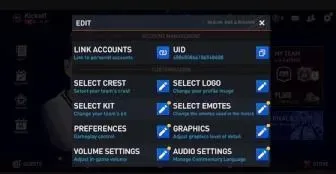
Open FC Mobile and tap the gear icon on the main screen. The settings page shows your UID with a copy button next to it. Copying is safer than typing because the UID is long.
Tips
- Make sure your account belongs to the Malaysia region.
- Check the item name before paying.
Why Top Up at ItemGame
- Automatic processing: most orders are delivered within minutes of payment confirmation
- Prices in your local currency, with the final total shown before you pay
- Pay with the QR, e-wallet and bank options available in your country, through licensed payment partners
- Only the account details the order form asks for, never your game password
- Support over WhatsApp and email with your invoice number
FC Mobile (MY) FAQ
1 Is this page for Malaysia accounts only?
2 Where do I find my User ID?
3 How long does it take for the FC Points to arrive?
4 My FC Points order has not arrived. What should I do?
5 What happens if I enter the wrong User ID?
6 Do I need to log in or share my password?
7 Which payment methods can I use?
To find your FC Mobile User ID:
- Open EA SPORTS FC Mobile.
- Tap the settings (gear) icon on the main screen.
- Find your UID and tap the copy button next to it.
- Paste it into the User ID field on ItemGame.