About League of Legends PC (MY)
This page is only for Riot accounts registered in the Malaysia (MY) region. Items bought here can’t be delivered to accounts in other regions.
League of Legends is Riot Games’ 5v5 MOBA on PC, where two teams battle on Summoner’s Rift to destroy the enemy Nexus. Riot Points (RP) are used to unlock champions, skins, event passes and other cosmetics.
What You Can Buy
RP in the following amounts:
- 575 RP
- 1380 RP
- 2800 RP
- 4500 RP
- 6500 RP
- 13500 RP
How to Top Up League of Legends PC (MY) on ItemGame
- Enter your Riot ID including the tagline, for example YourName#1234.
- Choose the item you want.
- Pay with one of the methods shown at checkout. The list depends on the store you shop in: in Indonesia you pay in rupiah with QRIS, e-wallets, bank virtual accounts or retail outlets, among others. In Malaysia the options include DuitNow QR, e-wallets such as Touch ‘n Go eWallet, Boost, GrabPay and ShopeePay, or cash at 7-Eleven.
- Once the payment is confirmed, the order is processed automatically to your account, 24 hours a day.
All we need is your Riot ID. ItemGame never asks for your password or a verification code, and you don’t need to log in anywhere to complete the top-up.
How to Find Your Riot ID
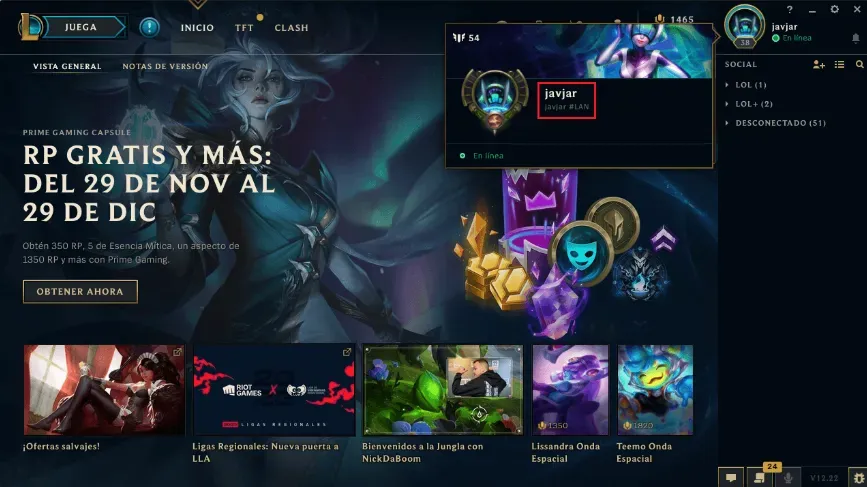
Your Riot ID is shown in the Name#Tagline format, for example YourName#1234. You can see it on your profile in the game or on your Riot account page in a browser. Enter both parts, including the # sign. Without the tagline, the account can’t be identified.
Tips
- Make sure your Riot account region is Malaysia.
- Always include the # sign and the tagline.
- Check the RP cost of the champion, skin or pass you want in the game first, so you can pick an amount that covers it.
- Double-check your Riot ID before paying. Orders go to the Riot ID you entered and can’t be reversed once delivered.
- If your RP hasn’t arrived, check the order status on your invoice page or in your order history, then contact us at cs@itemgame.com or WhatsApp +62 877 7077 7770 with your invoice number.