






Valorant MY
Valorant for Malaysia Accounts
This page is only for Valorant accounts registered in the Malaysia (MY) region. VP bought here cannot be delivered to accounts in other regions.
Valorant is Riot Games’ free-to-play 5v5 tactical shooter. Teams take turns attacking and defending to plant or defuse the Spike, and every Agent has a unique set of abilities. All Agents and weapons can be unlocked without paying; Valorant Points (VP) are used for weapon skins and bundles in the Store, the Battle Pass each Act, and Gun Buddies, Player Cards and Sprays.
What You Can Buy
VP in 475, 1000, 2050, 3650, 5350 and 11000 VP.
How to Top Up
- Enter your Riot ID, including the tagline, for example PlayerName#1234.
- Choose a VP amount.
- Pay with DuitNow QR, an e-wallet such as Touch ‘n Go eWallet, Boost, GrabPay or ShopeePay, or cash at 7-Eleven.
- After the payment is confirmed, the VP is sent to your account automatically.
How to Find Your Riot ID
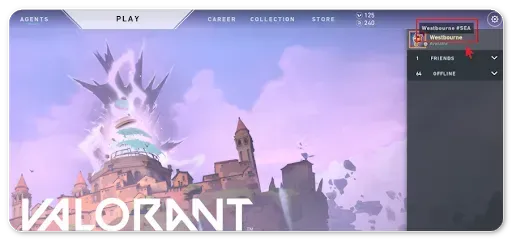
Open Valorant and hover over your name in the top-right corner of the client. Your Riot ID is shown as Name#Tagline. You can also see it on your Riot account page in a browser. Enter both the name and the tagline, including the # sign.
Tips
- Make sure your Riot account region is Malaysia.
- Always include the # and tagline.
- Check the VP price of the item you want in the Store first.
Why Top Up at ItemGame
- Automatic processing: most orders are delivered within minutes of payment confirmation
- Prices in your local currency, with the final total shown before you pay
- Pay with the QR, e-wallet and bank options available in your country, through licensed payment partners
- Only the account details the order form asks for, never your game password
- Support over WhatsApp and email with your invoice number
Valorant (MY) FAQ
1 Is this page for Malaysia accounts only?
2 What format should my Riot ID be in?
3 How long does it take for the VP to arrive?
4 My VP order has not arrived. What should I do?
5 What happens if I enter the wrong Riot ID?
6 Do I need to log in or share my password?
7 Which payment methods can I use?
To find your Riot ID:
- Open the Valorant client.
- Hover over your profile name in the top-right corner.
- Your Riot ID appears as Name#Tagline, for example PlayerName#1234.
- Enter the full ID, including the # and the tagline, on ItemGame.
Without the tagline the account cannot be identified.
Order Form Valorant MY
More PC Game top ups
Articles about Valorant MY

September 23, 2026
How to Find Your User ID and Server Before a Top Up: MLBB, Free Fire, PUBG Mobile, HoK and Valorant

September 23, 2026
VALORANT Champions Shanghai 2026 Starts September 24: Schedule, Groups and Paper Rex's Opener

March 7, 2026
Valorant 2026: Complete Economy Management Guide - Master Round Strategy and Buy Optimization