





Mobile Legends: Bang Bang MY
Mobile Legends for Malaysia Server Accounts
This page is only for Mobile Legends: Bang Bang accounts on the Malaysia (MY) server. Diamonds bought here cannot be delivered to accounts on other servers, so if you play on the Indonesian server, use the regular Mobile Legends page instead.
MLBB is the 5v5 MOBA from Moonton where two teams of five fight to destroy each other’s base. Diamonds are the premium currency for skins, heroes, Starlight and draw events. You only need your User ID and Zone ID to top up; there is no login.
What You Can Buy
- Diamonds: from 14 Diamonds (13 + 1 Bonus) up to 37510 Diamonds (31260 + 6250 Bonus). The number in each item name is the total you receive, bonus included.
- Weekly Pass: Weekly Diamond Pass (x1 to x5) and the Weekly Elite Pack.
- Monthly Pass: Monthly Elite Pack.
- Battle Pass: Twilight Pass for the current season’s premium rewards.
How to Top Up
- Enter your User ID and Zone ID.
- Choose Diamonds or a pass.
- Pay with DuitNow QR, an e-wallet such as Touch ‘n Go eWallet, Boost, GrabPay or ShopeePay, or cash at 7-Eleven.
- After the payment is confirmed, the order is processed automatically.
How to Find Your User ID and Zone ID
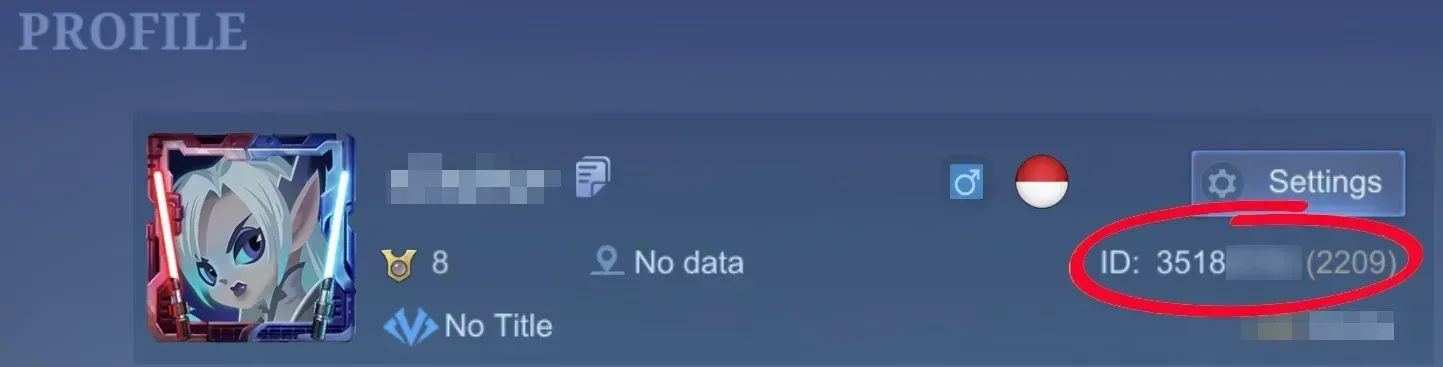
Tap your avatar in the top-left corner of the lobby. Your IDs appear under the nickname as 12345678 (1234): the first number is the User ID and the number in brackets is the Zone ID.
Tips
- Confirm that your account is on the Malaysia server before buying.
- Double-check both IDs. Delivered Diamonds cannot be moved to another account.
- For the Weekly Diamond Pass, log in daily so you do not miss the daily Diamonds.
Why Top Up at ItemGame
- Automatic processing: most orders are delivered within minutes of payment confirmation
- Prices in your local currency, with the final total shown before you pay
- Pay with the QR, e-wallet and bank options available in your country, through licensed payment partners
- Only the account details the order form asks for, never your game password
- Support over WhatsApp and email with your invoice number
Mobile Legends (MY) FAQ
1 Is this page for Malaysia server accounts only?
2 Where do I find my User ID and Zone ID?
3 How long does it take for the Diamonds to arrive?
4 My Diamonds order has not arrived. What should I do?
5 What happens if I enter the wrong User ID and Zone ID?
6 Do I need to log in or share my password?
7 Which payment methods can I use?
To find your User ID and Zone ID:
- Open Mobile Legends and go to the lobby.
- Tap your avatar in the top-left corner.
- Read the numbers under your nickname, shown as 12345678 (1234).
- Enter the first number as User ID and the number in brackets as Zone ID.
Make sure the account plays on the Malaysia server before you pay.
Order Form Mobile Legends: Bang Bang MY
More Mobile Game top ups
Articles about Mobile Legends: Bang Bang MY

September 23, 2026
How to Find Your User ID and Server Before a Top Up: MLBB, Free Fire, PUBG Mobile, HoK and Valorant

September 23, 2026
How to Secure Your Mobile Legends Account From Hackers and Recover It if It's Stolen

September 23, 2026
MLBB 10th Anniversary Free Skins: How to Get Nana, Chou and Layla Collector