








Top Up Honor of Kings Tokens with UID
About Honor of Kings
Honor of Kings is Tencent’s 5v5 MOBA, one of the most played mobile games in the world, with a large roster of heroes and fast-paced ranked matches. Tokens are its premium currency, used for heroes, skins and other cosmetics in the shop. Tokens do not make heroes stronger, so matches stay fair.
What You Can Buy
Token packs of 16, 80, 240, 400 and 560 Tokens, plus 800 + 30, 2400 + 108, 4000 + 180 and 8000 + 360 Tokens. In packs with a plus sign, the second number is bonus Tokens delivered together with the main amount.
How to Top Up Honor of Kings on ItemGame
- Choose a Token pack.
- Enter your User ID (UID).
- Pick a payment method and pay.
- After the payment is confirmed, the Tokens are processed to your account automatically.
How to Find Your UID
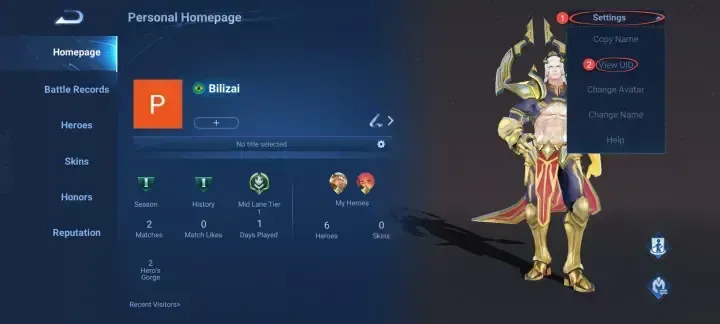
Open Honor of Kings, tap your profile avatar in the top-left corner, tap Settings in the top-right corner and choose UID (View UID in older versions). Copy the number and paste it into the User ID field.
Tips
- Copy the UID instead of typing it; one wrong digit sends the Tokens elsewhere.
- Check the Token price of the skin or hero you want first.
- Keep your invoice number until the Tokens show up.
Why Top Up at ItemGame
- Automatic Process
- No Password Needed
- Local Payments
- Customer Support
To find your Honor of Kings UID:
- Open the game and go to the main menu.
- Tap your profile avatar in the top-left corner.
- Tap Settings in the top-right corner and choose UID (View UID in older versions).
- Copy the UID and paste it into the User ID field on ItemGame.