

Bigo Live logo

Top Up Bigo Live Diamonds with Bigo ID

About Bigo Live

Bigo Live is a social live streaming platform where people broadcast chats, talent shows, gaming and interactive sessions for viewers around the world. Features such as multi-guest rooms and PK battles between hosts keep things lively, and viewers show support by sending virtual gifts. Gifts and premium features are paid for with Diamonds, and this page is where you top them up.

What You Can Buy

Every item on this page is Bigo Live Diamonds, in a wide range: 25 and 50 Diamonds for small gifts, mid-range amounts such as 500, 1000 and 5000 Diamonds for active viewers, and large packs up to 50000 Diamonds for supporters who prefer one big top-up. In the app, Diamonds are used to buy and send virtual gifts to hosts, support hosts during PK battles and buy memberships or special items.

How to Top Up Bigo Live on ItemGame

  1. Enter your Bigo ID (the number, not your display name).
  2. Choose the item you want.
  3. Pay with the local e-wallets, QR and bank options available in your country.
  4. After the payment is confirmed, the order is processed automatically and delivered to your account.

How to Find Your Bigo ID

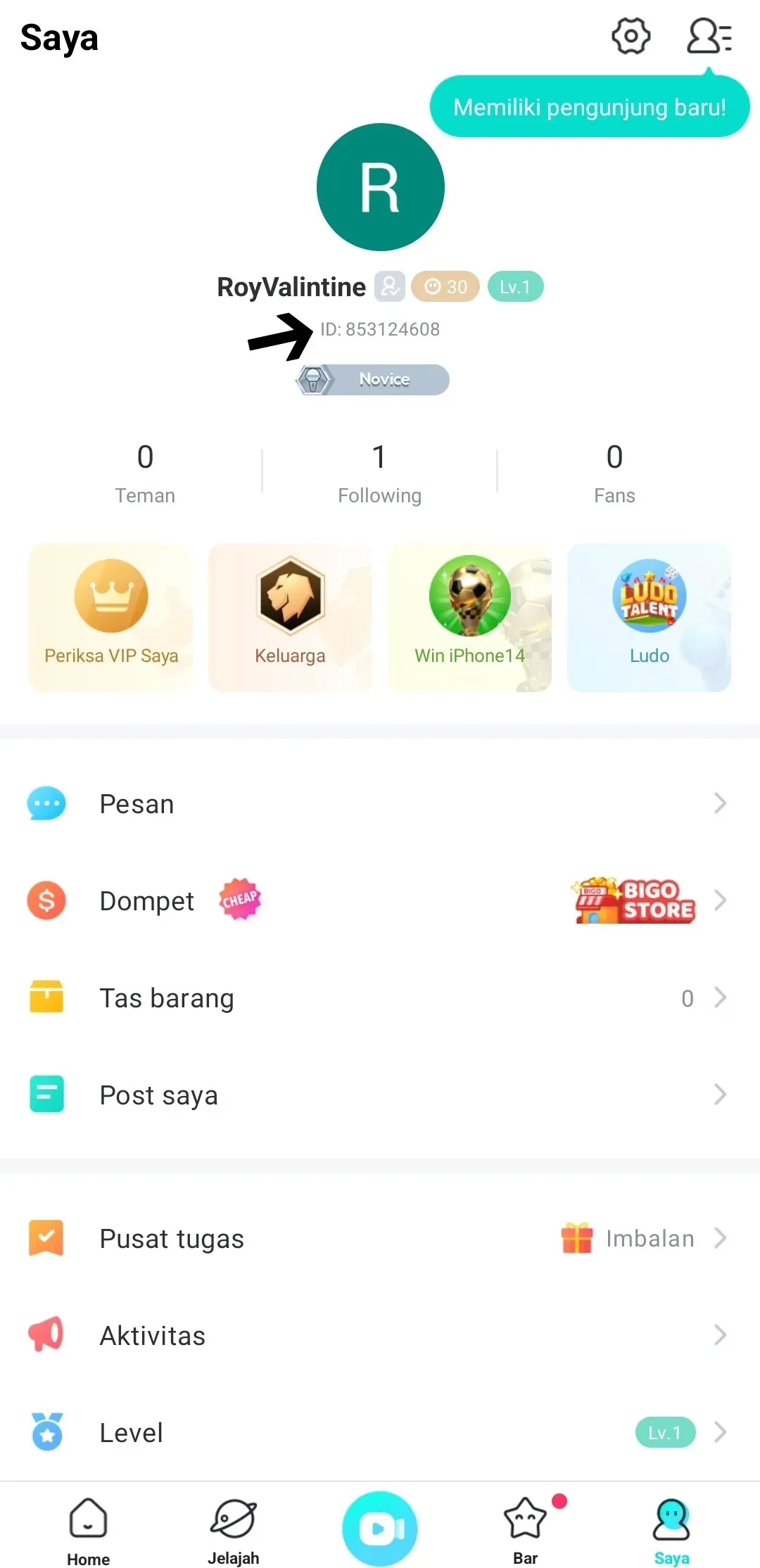
Open Bigo Live and tap the Me tab in the bottom-right corner. On your profile page, your Bigo ID is the number shown under your photo and profile name. Tap it to copy, then paste it into the ID field on ItemGame. Use the ID, not the username, because the name can change while the ID does not.

Tips

  • Check your Bigo ID twice before paying; Diamonds delivered to another account cannot be moved back.
  • If you regularly support the same host, a mid-range pack is often more practical than many small top-ups.
  • If your balance has not changed, close and reopen the app and check your profile again.
  • Keep your invoice number until the item shows up in your account.
  • If nothing has arrived after a few minutes, check your invoice page, then contact support with your invoice number.

Why Top Up at ItemGame

  • Automatic Process
  • No Password Needed
  • Local Payments
  • Customer Support

Order Form Bigo Live

1 Enter Account Data

Required

You can find this in your in-game profile. Double-check it before ordering. Make sure the data you entered is correct.

2 Select Item

Required

Bigo Live price list for the Philippines store (PHP).

3 Payment Method Required

4 Contact Information

Required

Your invoice and receipt will be sent to this email

Optional

Total Payment

Item -
Payment Method -
Price PHP 0.00
Admin Fee PHP 0.00
Total Payment PHP 0.00

More Entertainment top ups

Articles about Bigo Live