The Ants: Underground Kingdom
About The Ants: Underground Kingdom
The Ants: Underground Kingdom is a strategy simulation game where you grow an ant colony from a single Queen into a large underground kingdom. You dig tunnels, hatch workers and soldiers, gather resources, join an alliance, and send troops to the surface to hunt and fight other colonies. AntCoin is the currency for speeding things up and getting special ants, and this page tops it up to your account.
What You Can Buy
AntCoin in a wide range of amounts: 22, 100, 500, 1000, 1500, 2000, 2500, 3000, 5000, 10000, 20000, 50000 and 100000 AntCoin. Small amounts cover a single speed-up, mid amounts suit active players in alliance events, and large amounts are for players who want much faster progress. In the game, AntCoin speeds up construction, hatching and evolution, buys resources instantly and unlocks special ant hatching.
How to Top Up The Ants at ItemGame
- Choose an AntCoin amount.
- Enter your User ID. It is a string of numbers, not your colony name.
- Pick a payment method and pay.
- Once the payment is confirmed, the AntCoin are delivered automatically. Check the balance at the top of the screen or your in-game mail.
How to Find Your User ID
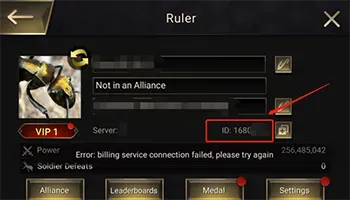
Open the game and tap your profile avatar in the top-left corner of the main screen. Open Settings, where your User ID is shown as a string of numbers. Copy it into the User ID field at ItemGame. Use the number, not the colony name, because names can change while the ID stays the same.
Tips
- If you are saving for an event, check how many AntCoin you need in the game first.
- Keep your invoice number until the AntCoin show in your account.
- If nothing shows, restart the game and check your mail before contacting support.
Why Top Up at ItemGame
- Automatic processing: most orders are delivered within minutes of payment confirmation
- Prices in your local currency, with the final total shown before you pay
- Pay with the QR, e-wallet and bank options available in your country, through licensed payment partners
- Only the account details the order form asks for, never your game password
- Support over WhatsApp and email with your invoice number
How to find your The Ants: Underground Kingdom User ID:
- Open the game and log in to the account you want to top up.
- On the main screen, tap your profile avatar in the top-left corner.
- Open Settings. Your User ID is shown there as a string of numbers.
- Copy it into the User ID field at ItemGame.
- Check every digit before you pay.
Use the User ID, not the colony name: names can change, the ID does not.