Top Up Command & Conquer: Legions Gold
Command & Conquer: Legions, the Classic RTS on Mobile
Command & Conquer: Legions brings the legacy of the Command & Conquer real-time strategy series to mobile. You build a base, train troops, lead commanders and battle other players on a large scale. It’s a good fit for strategy fans who enjoy managing resources and planning long-term tactics. On this page you can top up Gold with just your User ID and server, no login required.
What You Can Buy
Gold is the premium currency in Command & Conquer: Legions. It’s used to speed up progress such as construction, research and troop training, and to buy resources and other premium items. The packs available on ItemGame already include bonus Gold:
- 200 + 200 Bonus Gold
- 1050 + 315 Bonus Gold
- 2200 + 660 Bonus Gold
- 4600 + 1380 Bonus Gold
- 12000 + 3600 Bonus Gold
- 25000 + 7500 Bonus Gold
The number after the plus sign is the bonus that is added to your account together with the main pack.
How to Top Up Command & Conquer: Legions on ItemGame
- Choose the Gold pack you need.
- Enter your account’s User ID in the field provided.
- Select your account’s Server from the list, Battlefield-1 through Battlefield-11.
- Choose a payment method, such as QRIS, e-wallets, bank virtual account or cash at Alfamart or Indomaret, and complete the transaction. Your Gold is processed automatically once the payment is confirmed.
How to Find Your User ID and Server
- Open Command & Conquer: Legions and go to the main menu.
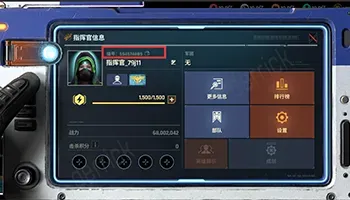
- Tap your profile avatar in the top left corner of the screen.
- Your User ID is shown below your commander name.
- On the same page or on the server selection screen, check the Battlefield number your account plays on. This is the number you select as the Server on ItemGame.
Tips
- Choosing the wrong server (Battlefield) is the most common reason Gold doesn’t arrive. Make sure the Battlefield number matches the one shown in the game.
- Check your User ID twice before paying; Gold sent to another account can’t be pulled back.
- Pick a pack that fits what you need, for example to speed up one big research project or to prepare for a particular event.
- Keep your invoice number until the Gold shows up in your balance.
- If your Gold hasn’t arrived after the payment is confirmed, check your transaction history on ItemGame, then contact support with your invoice number.
ItemGame’s top-up system runs automatically 24/7, so you can add Gold whenever you need it before your next battle.
Why Top Up at ItemGame
- Automatic Process
- No Password Needed
- Local Payments
- Customer Support
How to find your Command & Conquer: Legions User ID and Server:
- Open Command & Conquer: Legions and wait until you reach the main menu.
- Tap your profile avatar in the top left corner of the screen.
- Your User ID is shown below your commander name. Copy the number carefully.
- Also check the Battlefield number your account plays on; you can see it on your profile or on the server selection screen.
- Enter your User ID in the User ID field on ItemGame, then select the same Battlefield in the Server field.
Choosing the wrong server is the most common reason Gold doesn’t arrive, so double-check before you pay.