
Top Up Dragonheir: Silent Gods Dragon Crystal
About Dragonheir: Silent Gods
Dragonheir: Silent Gods is a high-fantasy strategy RPG for mobile that combines grid-based turn-based combat with tabletop-style dice rolls. You explore the world of Adenthia, collect heroes from different races and factions and build formations to face tougher enemies every season. It suits players who enjoy tactical RPGs with hero collecting and seasonal content.
What You Can Buy
- Dragon Crystal: Dragon Crystal 14000 and Dragon Crystal 35000 for premium currency needs.
- Wyrmarrow Mining Warrant: a special item for getting Wyrmarrow, a resource tied to hero summons.
- Bundles: Departure Supply, Epic Hero Option Chest, Apprentice’s Secret Collection, Scholar’s Secret Collection, Master’s Secret Collection, Heliolite Rush Chest, Heliolite Miracle Chest and New Season Growth Perks. Each contains the items and resources its name describes; check the exact contents in the in-game shop.
How to Top Up Dragonheir: Silent Gods on ItemGame
- Enter the User ID of your Dragonheir account.
- Choose the item you want.
- Pay with the local e-wallets, QR and bank options available in your country.
- After the payment is confirmed, the order is processed automatically and delivered to your account.
How to Find Your User ID
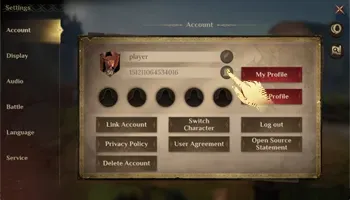
Open Dragonheir: Silent Gods, tap the Settings (gear) icon and choose Account. Your User ID is shown under your character name. Copy the number into the User ID field on ItemGame.
Tips
- Check your User ID twice before paying; items delivered to another account cannot be moved back.
- Look at a bundle’s contents in the in-game shop first so it fits this season’s goals.
- Some bundles have a purchase limit per account or per season, so make sure your account can still buy them.
- Keep your invoice number until the item shows up in your account.
- If nothing has arrived after a few minutes, check your invoice page, then contact support with your invoice number.
Why Top Up at ItemGame
- Automatic Process
- No Password Needed
- Local Payments
- Customer Support
To find your Dragonheir User ID:
- Open the game.
- Tap the Settings (gear) icon.
- Choose Account.
- Copy the User ID under your character name into ItemGame.
Dragonheir: Silent Gods FAQ
1 Where do purchased items appear?
Usually in your in-game mailbox or directly in your balance, a few minutes after the payment is confirmed.
2 How long does it take for the items to arrive?
Usually a few minutes after the payment is confirmed. Orders are processed automatically, 24 hours a day.
3 My items order has not arrived. What should I do?
Check the order status on your invoice page or in your order history. If it is paid but nothing has arrived, contact us at cs@itemgame.com or WhatsApp +62 877 7077 7770 with your invoice number.
4 What happens if I enter the wrong User ID?
The order is sent to the User ID you entered and cannot be pulled back once delivered, so double-check it before you pay.
5 Do I need to log in or share my password?
No. We only need your User ID. ItemGame never asks for your password or verification codes.
6 Which payment methods can I use?
The options follow your store region: local e-wallets, QR payments and bank or over-the-counter options available in your country. The full list appears on the payment page at checkout.