Top Up Dynasty Heros Voucher by User ID
About Dynasty Heros
Dynasty Heros is a mobile strategy RPG based on the story of the Three Kingdoms (Samkok) in ancient China. You play as a leader who gathers legendary generals and strategists such as Lu Bu, Guan Yu, Cao Cao and Zhuge Liang, then sets up formations to win tactical battles and conquer territory. This page is for Dynasty Heros players who want to add premium balance to their account quickly.
What You Can Buy
The items on sale are Voucher packs with bonuses, ranging from 99 Voucher+14 Voucher up to 39999 Voucher+6799 Voucher. The number after the plus sign is the bonus that comes with the pack, so the larger packs give a more noticeable bonus.
Voucher is credited to your game account and is used for premium purchases in the game, such as recruiting rare heroes, speed-up items and other premium resources. Check in the game how much Voucher you need for your recruitment goal first, then pick the pack that comes closest.
How to Top Up Dynasty Heros on ItemGame
- Choose the Voucher pack you want from the item list.
- Enter your account’s User ID, then select the Server your character is on from the dropdown list.
- Choose a payment method, such as QRIS, e-wallets, bank virtual account or cash at Alfamart or Indomaret.
- Complete the payment. The Voucher is sent to your account automatically once the payment is confirmed.
How to Find Your User ID and Server
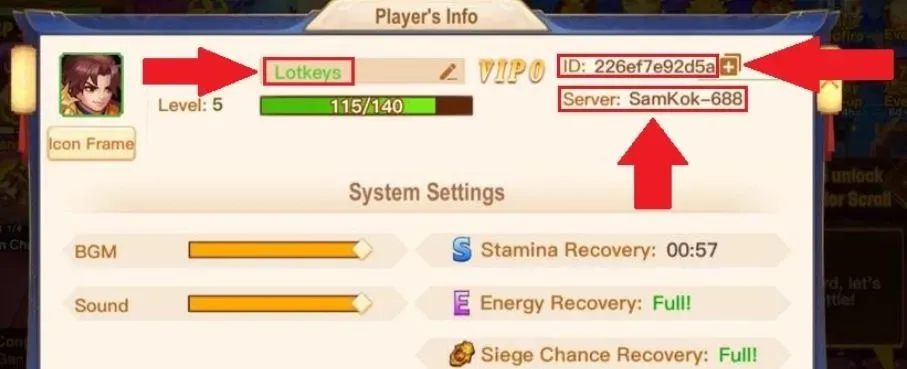
Log in to the game, then tap the profile avatar icon in the top left corner of the main screen. Your User ID is shown below your character name, and the name of the server you play on is displayed on the same page. Select exactly the same server on ItemGame, for example SamKok-1 or another numbered server.
Tips
- Check your User ID and Server twice; Voucher credited to another account can’t be pulled back.
- If you have characters on several servers, make sure you select the server of the character you want to top up.
- Pick an amount that fits what you need, for example just enough for the recruitment round you’re aiming for.
- Keep your invoice number until you see the balance go up in your account.
- If it hasn’t arrived after a few minutes, check your transaction history, then contact support with your invoice number.
With the right account details, your balance is ready to use to strengthen your army and unite the land.
Why Top Up at ItemGame
- Automatic Process
- No Password Needed
- Local Payments
- Customer Support
How to find your User ID and Server in Dynasty Heros:
- Open the game and log in to the character you want to top up.
- On the main screen, tap the profile avatar icon in the top left corner.
- On the profile page, your User ID is shown below your character name. Copy or note down every character, without spaces.
- Also check the server name shown on the same page, for example SamKok-1 or another numbered server.
- On the ItemGame top-up page, enter your User ID in the field provided, then select exactly the same Server from the dropdown list.
If you play on more than one server, make sure you select the server of the character you want to top up, because delivery follows the details you enter.