Top Up Football Rising Star Diamonds
About Football Rising Star
Football Rising Star is a mobile football career game. Instead of managing a club, you play as a single player working your way up from youth prospect to star: training, playing matches, making key decisions and building a reputation on and off the pitch. The game uses Diamonds to speed up your character’s development and unlock premium items, and this page is where you add them to your account.
What You Can Buy
The items on this page are Diamonds in several packs. The smallest is 60 Diamonds, while the other packs are listed with a bonus: 300 + 30 Diamonds, 680 + 340 Diamonds, 1280 + 1280 Diamonds, 3280 + 3280 Diamonds and 6480 + 6480 Diamonds. The bonus is already written in the item name, so you know the total you’ll receive. In the game, Diamonds are generally used for training boosts, energy refills and premium items that help your career along.
How to Top Up Football Rising Star on ItemGame
- Choose the Diamonds pack you want from the item list.
- Enter your account’s User ID in the field provided.
- Select the Platform you play on, Android or iOS, from the dropdown. This has to match the device you log in with.
- Choose a payment method, such as QRIS, e-wallets (DANA, OVO, ShopeePay, LinkAja), a bank virtual account or cash at Alfamart or Indomaret, then complete the payment. The Diamonds are sent automatically once the payment is confirmed.
How to Find Your User ID
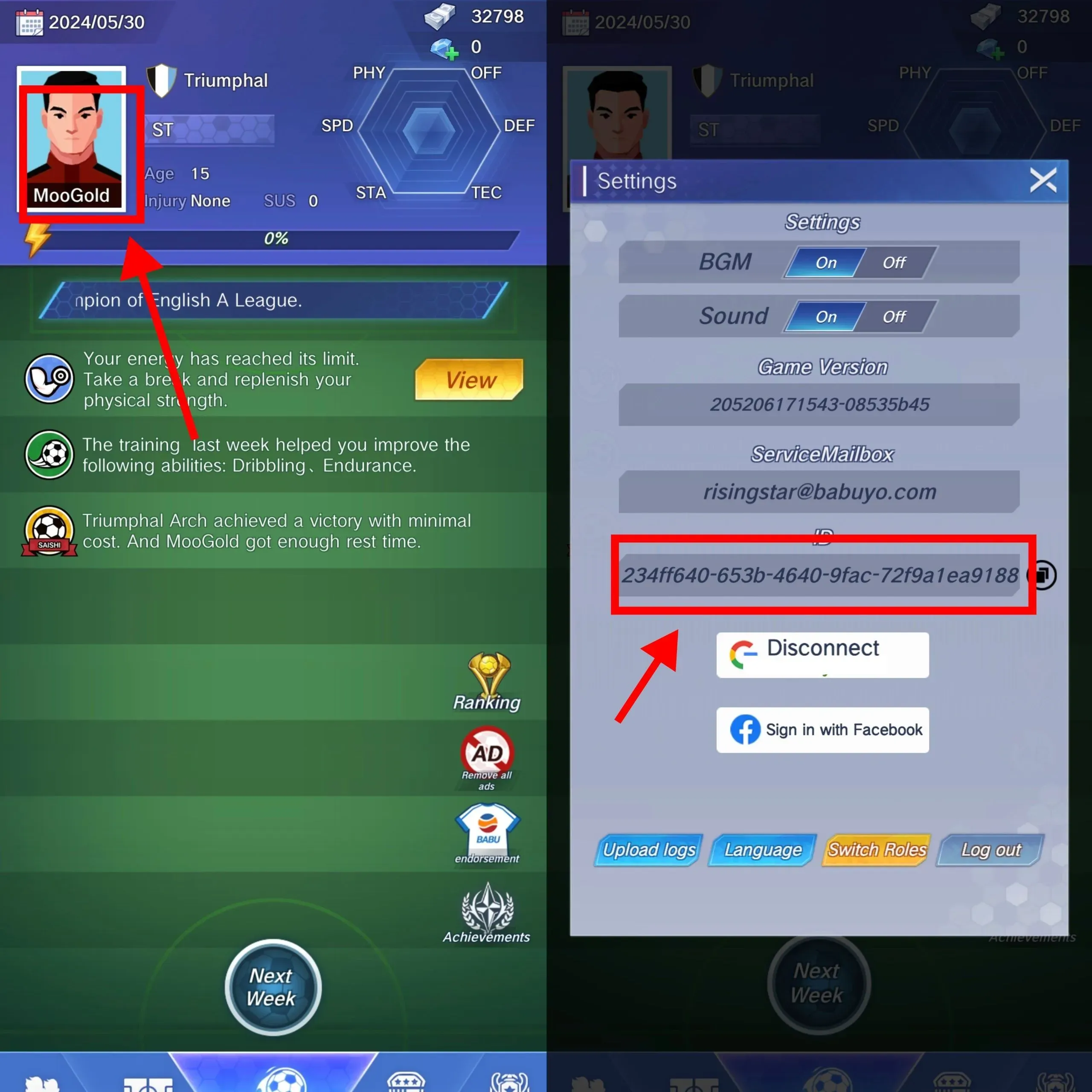
Open Football Rising Star and tap the profile menu or avatar in the top-left corner of the main screen. On the profile page, your User ID appears as a string of numbers near your character name. Copy it and paste it into the User ID field on ItemGame. If your game screen looks slightly different, check the profile or account settings menu; the User ID is almost always there.
Tips
- Double-check your User ID and Platform before paying. Diamonds that land in another account can’t be pulled back.
- Pick a pack that fits what you need. Look at the bonus in the item name so your total Diamonds match your target.
- Keep your invoice number as proof of purchase until the Diamonds show up in your account.
- If the Diamonds haven’t appeared, close and reopen the game and check your balance before contacting support.
- Never share your password or account verification codes with anyone.
Once your Diamonds arrive, get back to training and chase that dream club contract.
Why Top Up at ItemGame
- Automatic Process
- No Password Needed
- Local Payments
- Customer Support
How to find your Football Rising Star User ID:
- Open Football Rising Star and log in to the account you want to top up with Diamonds.
- On the main screen, tap the profile menu or avatar in the top-left corner.
- On the profile page, look for the string of numbers near your character name. That’s your User ID.
- Copy the number, then paste it into the User ID field on the ItemGame page.
- Select the Platform that matches your device, Android or iOS, then check all your details again before paying.
Use the numeric User ID, not your character name, because names can be shared between players while the ID is always unique. Also make sure the account you’re logged in to is the one you want to top up.