Top Up Harry Potter: Magic Awakening Jewels
Harry Potter: Magic Awakening, Magical Card Duels at Hogwarts
Harry Potter: Magic Awakening is a collectible card RPG set a few years after the Battle of Hogwarts. You play as a new student, get sorted into one of the houses and duel using a deck of cards representing spells, magical creatures and iconic items from the Harry Potter world. This page is for players who want to top up Jewels quickly using just their User ID and server, with no login required.
What You Can Buy
Jewels are the premium currency in Harry Potter: Magic Awakening, used to buy card packs, outfits, decoration items and other offers in the in-game shop. Packs available on ItemGame:
- 60 Jewels
- 300 Jewels
- 680+70 Jewels
- 980+165 Jewels
- 1280+270 Jewels
- 1980+380 Jewels
- 3280+780 Jewels
- 6480+2000 Jewels
The number after the plus sign is the bonus Jewels added together with the main pack.
How to Top Up Harry Potter: Magic Awakening on ItemGame
- Choose the Jewels pack you need.
- Enter your account’s User ID in the field provided.
- Select your account’s Server from the list, for example Ashwinder, Erumpent, Sphinx, Rougarou, or whichever server matches the one shown in the game.
- Choose a payment method, such as QRIS, e-wallets, bank virtual account or cash at Alfamart or Indomaret, and complete the transaction. Your Jewels are processed automatically once the payment is confirmed.
How to Find Your User ID and Server
- Open Harry Potter: Magic Awakening and go to the main screen.
- Tap the Knapsack (bag) in the bottom right corner.
- Open the Info tab.
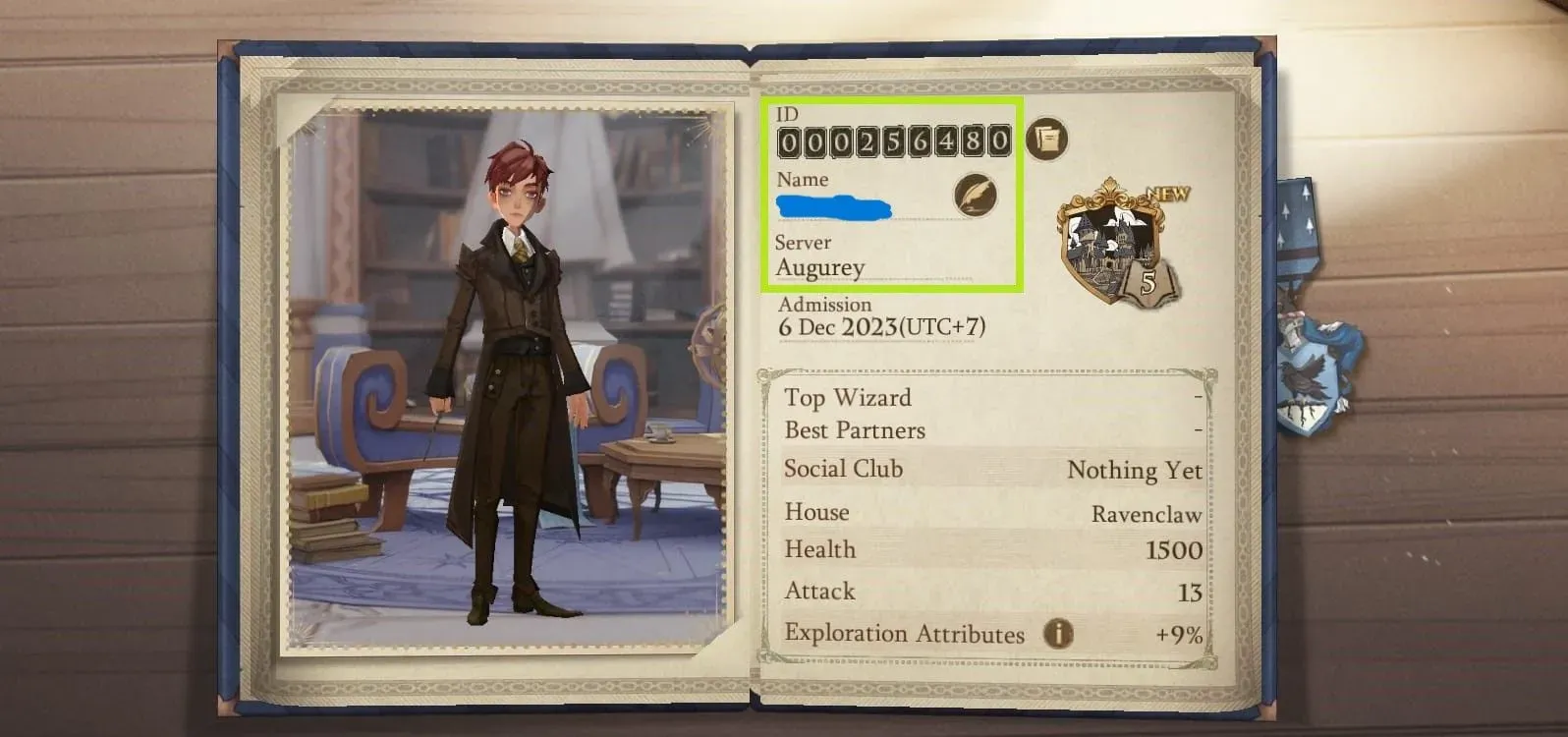
- Your User ID and server name appear on the right side of your character info. Copy the User ID and remember the server name so you can select it on ItemGame.
Tips
- The server name must match exactly what is shown in your character info; some servers use names written in Chinese, Japanese or Korean characters, so compare them carefully.
- Check your User ID twice before paying; Jewels sent to another account can’t be pulled back.
- Pick a pack that fits your goal, for example a certain number of card packs or a specific outfit.
- Keep your invoice number until the Jewels show up in your balance.
- If your Jewels haven’t arrived after the payment is confirmed, check your transaction history on ItemGame, then contact support with your invoice number.
Jewels top-ups on ItemGame run automatically 24/7, so you can top up whenever you like before your next duel.
Why Top Up at ItemGame
- Automatic Process
- No Password Needed
- Local Payments
- Customer Support
How to find your Harry Potter: Magic Awakening User ID and Server:
- Open Harry Potter: Magic Awakening and wait until you reach the main screen.
- Tap the Knapsack (bag icon) in the bottom right corner of the screen.
- Open the Info tab.
- Your User ID and server name appear on the right side of your character info. Copy the User ID carefully and note down the server name.
- Enter your User ID in the User ID field on ItemGame, then select the server with exactly the same name from the list.
Choosing the wrong server is the most common reason Jewels don’t arrive, so double-check before you pay.