Top Up MARVEL SNAP Gold by Snap ID
About MARVEL SNAP
MARVEL SNAP is a collectible card game from Second Dinner with very short matches: a 12-card deck, six turns and three locations with random effects that you need to control. The SNAP mechanic lets you double the Cube stakes when you are confident of winning, so every match feels fast and tense. It suits Marvel fans and card game players who want short but strategic sessions. Gold is MARVEL SNAP’s premium currency for buying card variants and the Season Pass, and for exchanging into Credits. On ItemGame, you only need your Snap ID to top up, with no account login.
What You Can Buy
MARVEL SNAP on ItemGame focuses on Gold, the premium currency used to:
- Buy card variants that appear in the daily shop.
- Buy the premium Season Pass for the current season’s cards, variants and rewards.
- Exchange Gold for Credits to speed up card upgrades and your Collection Level.
- Refresh daily missions and cover other in-game needs.
The available Gold amounts are shown in the product list on this page. Gold is sent straight to the account that matches the Snap ID you enter.
How to Top Up MARVEL SNAP on ItemGame
- Enter your MARVEL SNAP Snap ID in the field provided. A Snap ID is made up of a name and a tag, in the format Name#1234.
- Choose the Gold amount you want to buy.
- Choose a payment method and complete the payment following the instructions on the transaction page.
- Once the payment is confirmed, the Gold is processed automatically and added to your account. Check your Gold balance in the game.
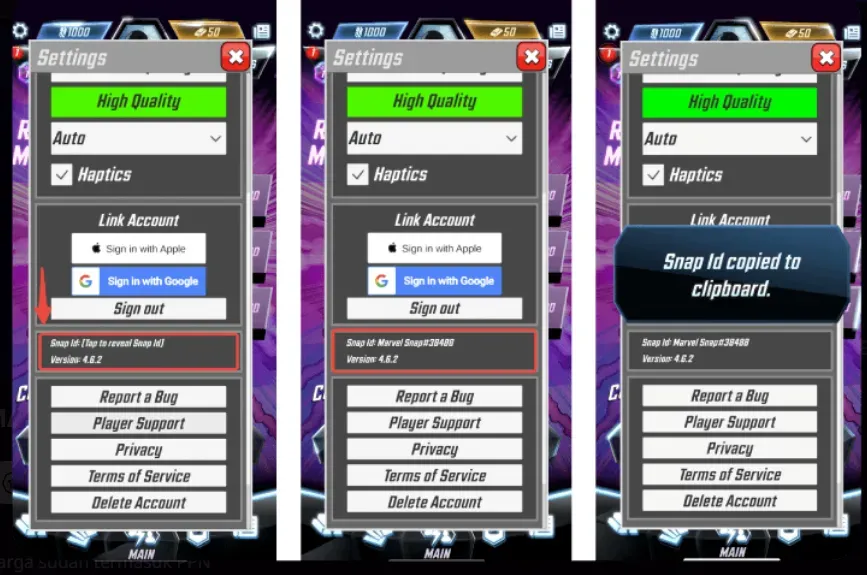
How to Find Your Snap ID
- Open MARVEL SNAP and go to the main screen.
- Tap the Settings icon (gear) in the top-left corner.
- Scroll to the bottom of the settings page; your Snap ID is shown there. Tap it to reveal it, then copy it.
- Paste your full Snap ID including the tag (Name#1234) into the Snap ID field on ItemGame.
Tips
- Enter your full Snap ID with the hash sign and tag number; without the tag, your account cannot be identified.
- Double-check the spelling of the name and tag before paying. Gold that has gone to another account cannot be pulled back.
- Pick an amount that fits what you need, for example matching the cost of the Season Pass or the card variant you want in the game.
- Keep your invoice number until the Gold shows up in your account.
- If the Gold has not arrived after a few minutes, check the invoice page, then contact ItemGame support with your invoice number.
Top-ups are processed automatically 24/7, so you can get back to the table and SNAP at the right moment.
Why Top Up at ItemGame
- Automatic Process
- No Password Needed
- Local Payments
- Customer Support
How to find your MARVEL SNAP Snap ID to top up on ItemGame:
- Open the MARVEL SNAP app and wait until you reach the main screen.
- Tap the gear-shaped Settings icon in the top-left corner of the screen.
- Scroll to the bottom of the settings page. Your Snap ID is shown there; tap it to reveal it, then use the copy button.
- Paste your full Snap ID including the tag, in the format Name#1234, into the Snap ID field on ItemGame.
Make sure the hash sign and tag number are copied too, and that the name is spelled exactly as in the game. Check again before paying, because Gold sent to another account cannot be moved.