Top Up Light of Thel: New Era Crystals
Light of Thel: New Era, a Colourful Anime MMORPG
Light of Thel: New Era is a mobile MMORPG with a bright anime art style. You choose a class such as Warrior, Mage, Archer or Priest, then explore the world of Thel, complete quests, clear dungeons and team up with other players. It’s a good fit if you enjoy laid-back adventures with plenty of cosmetics. On this page you can top up Crystals with just your User ID, no login required.
What You Can Buy
Crystals are the premium currency in Light of Thel: New Era, used for outfit, mount and pet gacha, and to buy speed-up items for equipment upgrades. Amounts available on ItemGame:
- 90 Crystals
- 450 Crystals
- 630 Crystals
- 900 Crystals
- 1350 Crystals
- 1800 Crystals
- 2250 Crystals
- 2980 Crystals
- 4500 Crystals
- 6300 Crystals
- 9000 Crystals
- 15000 Crystals
- 32000 Crystals
Pick the amount that matches what you plan to spend in the game.
How to Top Up Light of Thel: New Era on ItemGame
- Choose the Crystals amount you need.
- Enter your Light of Thel: New Era User ID in the field provided.
- Choose a payment method, such as QRIS, e-wallets, bank virtual account or cash at Alfamart or Indomaret.
- Complete the payment. Once it’s confirmed, the Crystals are processed automatically to your account.
How to Find Your User ID
- Open Light of Thel: New Era and go to the main screen.
- Tap your character avatar in the top left corner of the screen.
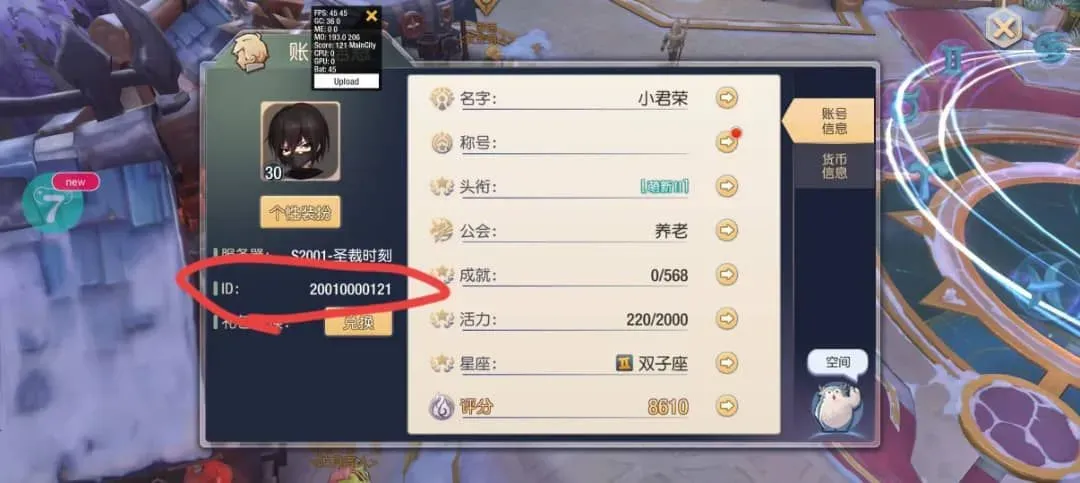
- Your character ID is shown among your profile information. This ID is what you enter as your User ID on ItemGame.
- Copy the number carefully, then paste it into the User ID field.
Tips
- Check your User ID twice before paying; Crystals sent to another account can’t be pulled back.
- If you have more than one character, make sure you use the ID of the character you want to top up.
- Pick an amount that fits your goal, for example one round of outfit gacha.
- Keep your invoice number until the Crystals show up in your balance.
- If your Crystals haven’t arrived after the payment is confirmed, check your transaction history on ItemGame, then contact support with your invoice number.
Light of Thel: New Era Crystals top-ups on ItemGame run automatically 24/7, so you can top up whenever you like before your next adventure.
Why Top Up at ItemGame
- Automatic Process
- No Password Needed
- Local Payments
- Customer Support
How to find your Light of Thel: New Era User ID:
- Open Light of Thel: New Era and wait until you reach the main screen.
- Tap your character avatar in the top left corner of the screen.
- Your character ID is shown among your profile information. This is the ID you enter as your User ID. Copy the number carefully.
- Paste the ID into the User ID field on the ItemGame top-up page.
If you have more than one character, make sure you use the ID of the character you want to top up. Crystals added to another account can’t be moved.