SUGO: Voice Live Chat Party
SUGO, a Voice Chat Party App for Chatting and Making New Friends
SUGO: Voice Live Chat Party is a social app focused on real-time voice interaction. You can create or join a Party Room to chat with lots of people, listen to music together, play light games inside the room, or have private 1-on-1 conversations. This page is for anyone who wants to top up SUGO Coins quickly with just their User ID, without logging in or sharing a password.
What You Can Buy
Coins are SUGO’s main currency, used to send virtual gifts to friends or room hosts, unlock premium features, and support your social experience in the app. The amounts available on ItemGame:
- 1200 Coins
- 2400 Coins
- 6250 Coins
- 12500 Coins
- 37500 Coins
- 65000 Coins
- 130000 Coins
Choose an amount based on how often you send gifts or use paid features in SUGO. The virtual gifts you send are also a way to show appreciation for the room hosts you support.
How to Top Up SUGO on ItemGame
- Choose the Coins amount you want.
- Enter your SUGO User ID in the field provided.
- Choose a payment method, such as QRIS, e-wallets, bank virtual account, or cash at Alfamart or Indomaret.
- Complete the payment. Once it is confirmed, the Coins are processed to your SUGO account automatically.
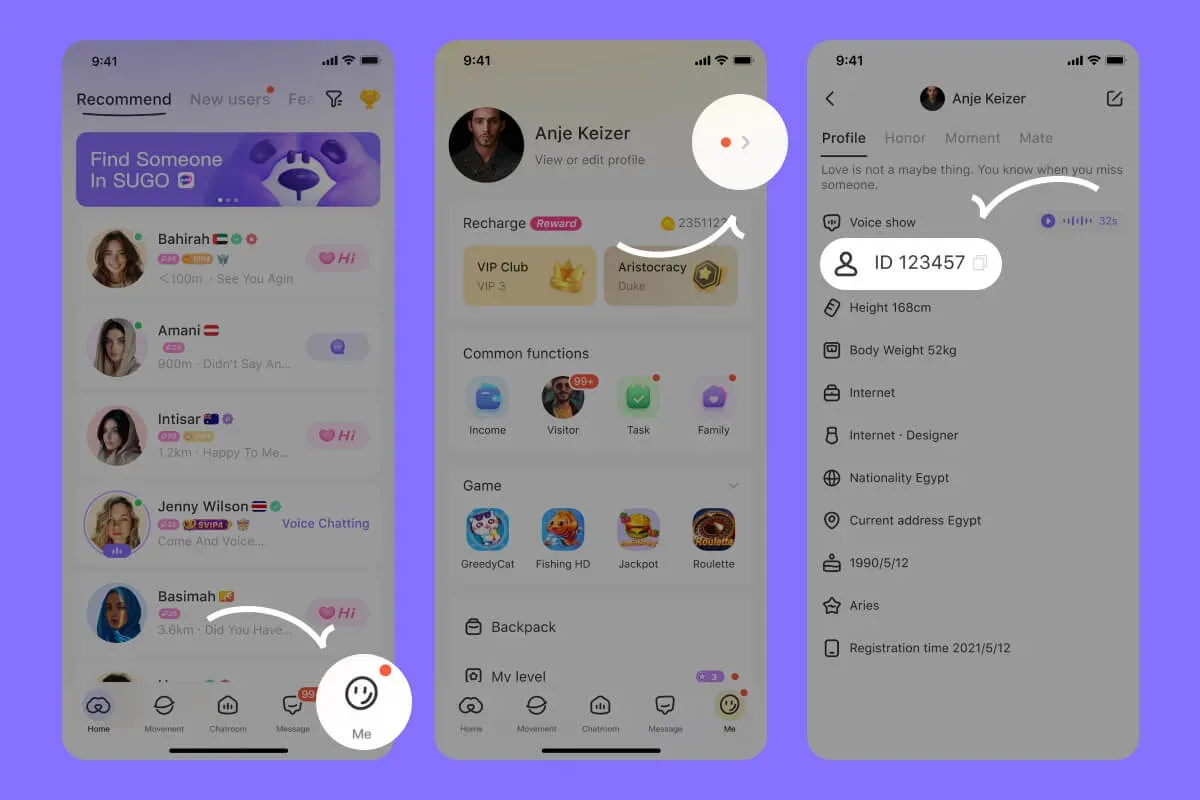
How to Find Your User ID
- Open the SUGO app and log in to your account.
- Tap the Me menu in the bottom-right corner.
- Your User ID is shown below your nickname.
- Copy the number, then paste it into the User ID field on ItemGame.
Tips
- Double-check your User ID before paying; Coins sent to another account cannot be reversed.
- Do not mix up your User ID and your nickname; what you need is the numeric ID.
- Choose an amount that fits your needs; if you are just trying out the gift feature, start with a smaller amount.
- Keep your invoice number until the Coins show up in your account balance.
- If the Coins have not arrived after the payment is confirmed, check your transaction history on ItemGame, then contact customer support with your invoice number.
SUGO Coins top-ups on ItemGame run automatically 24/7, so you can top up any time before you join your favorite Party Room.
Why Top Up at ItemGame
- Automatic processing: most orders are delivered within minutes of payment confirmation
- Prices in your local currency, with the final total shown before you pay
- Pay with the QR, e-wallet and bank options available in your country, through licensed payment partners
- Only the account details the order form asks for, never your game password
- Support over WhatsApp and email with your invoice number
How to find your SUGO: Voice Live Chat Party User ID:
- Open the SUGO app and make sure you are logged in to the account you want to top up.
- Tap the Me menu in the bottom-right corner of the screen.
- Your User ID is shown below your nickname. Copy the number carefully, or tap the copy icon if there is one.
- Paste the User ID into the User ID field on the ItemGame top-up page.
Do not confuse it with your nickname; what you need is the numeric ID. Coins sent to another account cannot be transferred.