Top Up Bermuda Video Chat via User ID
Bermuda, a Video Chat App for Meeting New People
Bermuda is a social app that connects you with new people from different countries through random video calls and live chats. It suits anyone who enjoys spontaneous conversations, wants to make friends across cultures, or simply wants to fill some free time with a good chat. On this page you can top up your Bermuda premium balance with just your account’s User ID, without logging in or sharing your password.
What You Can Buy
Premium balance in Bermuda is used for paid features inside the app, such as sending virtual gifts to the people you chat with, using friend search filters, and other interactive features that require coins. The packages you can buy are shown in the product list on this page, along with the amount that will be added to your account. Choose a package based on how often you use Bermuda’s premium features.
How to Top Up Bermuda on ItemGame
- Choose the package you want from the product list.
- Enter your Bermuda User ID in the field provided. Check every character again.
- Choose a payment method, such as QRIS, e-wallets, bank virtual account, or cash at Alfamart or Indomaret.
- Complete the payment. Once it is confirmed, the balance is processed to your Bermuda account automatically.
How to Find Your User ID
- Open the Bermuda app and log in to your account.
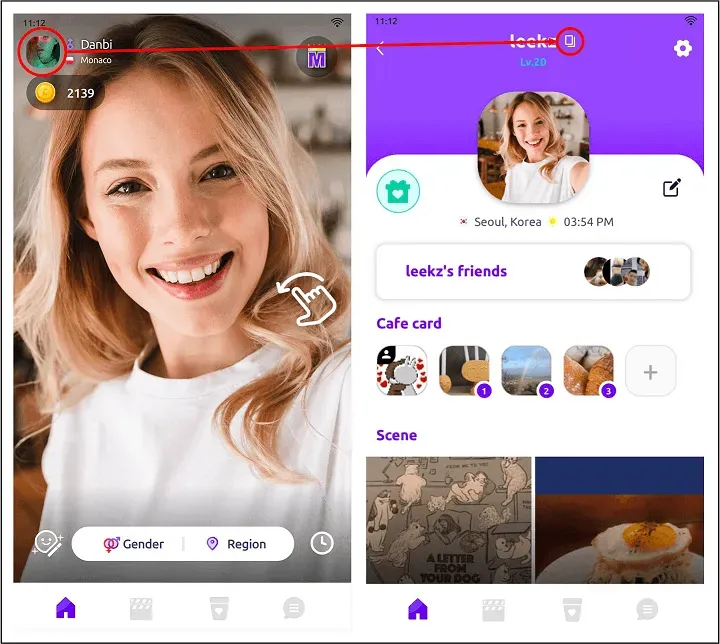
- Tap the profile icon, usually in one of the corners of the main screen.
- On the profile page, your User ID is shown below your nickname.
- Copy the User ID, then paste it into the User ID field on ItemGame.
If the app looks different after an update, look for the profile or account settings section; the ID is usually near the account name.
Tips
- Double-check your User ID before paying. Balance sent to another account cannot be reversed.
- Pick a package that fits your needs; if you are just trying out premium features, start with a smaller package.
- Keep your ItemGame invoice number until the balance shows up in your Bermuda account.
- If the balance has not arrived after the payment is confirmed, check your transaction history first, then contact customer support with your invoice number.
- Try closing and reopening the app if the balance does not appear yet, as the screen sometimes needs to refresh.
Bermuda top-ups on ItemGame are processed automatically 24/7, so you can add balance any time before you start a video chat.
Why Top Up at ItemGame
- Automatic Process
- No Password Needed
- Local Payments
- Customer Support
How to find your Bermuda User ID:
- Open the Bermuda app and make sure you are logged in to the account you want to top up.
- Tap the profile icon, usually in one of the corners of the main screen.
- On the profile page, your User ID is shown below your nickname. Copy it carefully, or tap the copy icon if there is one.
- Paste the User ID into the User ID field on the ItemGame top-up page.
Make sure the ID you enter belongs to the account you want to top up. Balance sent to another account cannot be transferred.