Buy Webtoon Koin Voucher Code for Preview Episode
Webtoon Koin: Read the Latest Episodes Early
Webtoon Koin is the virtual currency on the WEBTOON platform. Its main use is Preview Episode, which unlocks a series’ newest episodes before they are released for free to the public, while also supporting your favourite comic creators. This page offers Webtoon Koin vouchers as codes that you redeem yourself on your Webtoon account, without giving your login details to anyone.
What You Can Buy
Webtoon Koin vouchers come in two amounts:
- Webtoon 328 Koin
- Webtoon 497 Koin
The Koin you receive can be used for Preview Episode across many series, depending on how many Koin each episode costs. If you need more, you can buy several vouchers and redeem them one by one.
How to Buy a Webtoon Koin Voucher on ItemGame
- Choose the Webtoon Koin voucher amount you want.
- Fill in the email address or contact details requested so the voucher code can be sent to you. This product does not require a User ID.
- Choose a payment method, such as QRIS, e-wallets, bank virtual account or retail outlets (Alfamart/Indomaret), then complete the transaction.
- Once the payment is confirmed, the voucher code appears on your ItemGame invoice page and is sent to the contact you provided.
How to Redeem a Webtoon Koin Code
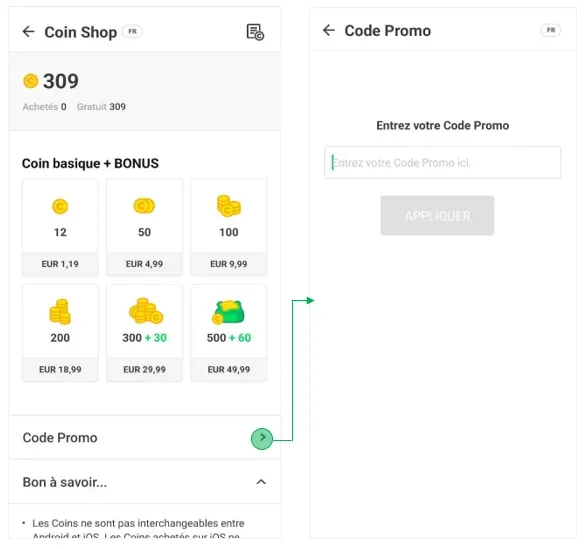
- Log in to your Webtoon account. Android users can use the app; iPhone or iPad users need to redeem through a browser at webtoons.com because of Apple and WEBTOON policies.
- Go to the Koin page or the code redemption menu.
- Enter the voucher code from ItemGame, then confirm.
- The Koin are added to your account balance and can be used for Preview Episode right away.
Tips
- Make sure you are logged in to the right Webtoon account before redeeming; Koin cannot be moved to another account once added.
- iOS users should open webtoons.com in a browser straight away so redemption goes smoothly.
- Keep your code and invoice number somewhere safe; a code that has been redeemed cannot be used again.
- Check WEBTOON’s latest terms and conditions on how long Koin stay valid.
- If the code does not appear after the payment is confirmed, check your invoice page or transaction history first, then contact support with your invoice number.
With a Webtoon Koin voucher from ItemGame, you can carry on reading your favourite stories without waiting for the free release.
Why Top Up at ItemGame
- Automatic Process
- No Password Needed
- Local Payments
- Customer Support
How to redeem a Webtoon Koin voucher:
- Once the payment is confirmed, copy the voucher code from your ItemGame invoice page or from the contact you provided. This product does not require a User ID when buying.
- Log in to the Webtoon account you want to top up. Android users can use the app; iPhone or iPad users need to open webtoons.com in a browser.
- Go to the Koin page or the code redemption menu, paste the voucher code, then confirm.
- Check the Koin balance on your account; the Koin can be used for Preview Episode right away.
Make sure you are using the right account, because Koin cannot be moved once added. A code that has been redeemed cannot be used again.