Top Up Chamet Diamonds via User ID
About Chamet
Chamet is a video chat social app that connects users from different countries through one-on-one video calls and party rooms with lots of people. It suits anyone who wants to find new people to talk to, follow their favorite hosts, or simply pass the time with live interaction. Chamet uses Diamonds as its currency for unlocking premium features and sending gifts, and this page is where you add them to your account.
What You Can Buy
This page offers Diamonds top-ups for Chamet accounts. The active amounts are listed at the top of the page, from small packages for trying out features to large packages for users who interact regularly. In the app, Diamonds are used for video calls with hosts, buying and sending virtual gifts to other users, and unlocking exclusive features available in the app.
How to Top Up Chamet on ItemGame
- Choose the Diamonds amount you want from the item list.
- Enter your Chamet User ID in the field provided. The User ID is a string of numbers, not your profile name.
- Choose a payment method, such as QRIS, e-wallets, bank virtual account, or cash at Alfamart or Indomaret, then complete the payment.
- Once the payment is confirmed, the Diamonds are sent to your account automatically. Check your balance on the profile page in the app.
How to Find Your User ID
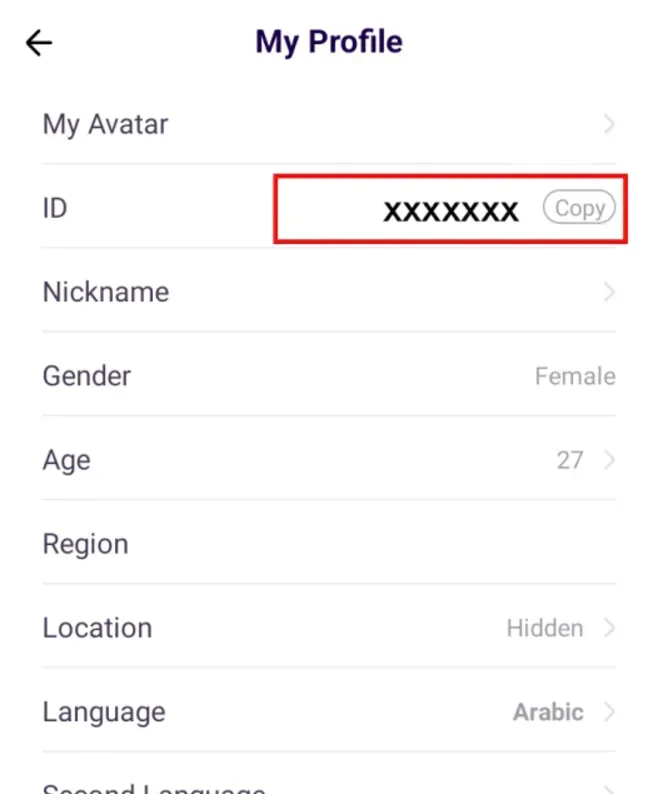
Open the Chamet app and tap the profile icon in the bottom-right corner. Go to the My Profile page, where your User ID is shown as a string of numbers, usually near your profile name. Copy that number and paste it into the User ID field on ItemGame. Make sure you copy the numeric ID, because your profile name can be changed and cannot be used for top-ups.
Tips
- Double-check your User ID before paying. Diamonds sent to another account cannot be reversed.
- Choose an amount that fits your needs. If you make video calls regularly, a mid-sized package is usually more practical than repeated small top-ups.
- Keep your invoice number as proof of the transaction until the Diamonds show up in your account.
- If your balance has not changed, close and reopen the app and check again before contacting customer support.
- Never share your Chamet password or verification code with anyone.
Once the Diamonds arrive, you can keep chatting without interruption.
Why Top Up at ItemGame
- Automatic Process
- No Password Needed
- Local Payments
- Customer Support
How to find your Chamet User ID:
- Open the Chamet app and log in to the account you want to top up with Diamonds.
- Tap the profile icon in the bottom-right corner of the screen.
- Select My Profile. On this page, look for the string of numbers shown near your profile name. That is your User ID.
- Copy the number, then paste it into the User ID field on the ItemGame page.
- Check every digit again before tapping the pay button.
Use the numeric User ID, not your profile name, because the name can be changed at any time while the ID stays the same. If you have more than one account, make sure you are logged in to the one you want to top up.