Top Up Delta Force Steam Delta Coins
About Delta Force Steam
Delta Force is a tactical FPS from TiMi Studio Group, available on PC through Steam. It brings back the classic Delta Force series with large-scale battles involving land and air vehicles, plus an extraction mode that rewards teamwork and quick decisions. You pick Operators with different roles and tune your loadout to match your playstyle. This page is only for players of the Steam version of Delta Force (global PC), not the Garena version, so make sure you are on the right page.
What You Can Buy
The product on this page is Delta Coins, Delta Force’s premium currency, often also called DF-Coin. The available amounts are shown in the item list on this page. In the game, Delta Coins are mainly used to buy the seasonal Battle Pass, unlock new Operators, and pick up weapon skins and other cosmetics from the store.
Choose a pack that matches what you plan to buy: a small pack to cover a few missing coins, or a larger one if you are going for a bundle or pass in one go. Check how many coins the item costs in the game first so you pick the right amount.
How to Top Up Delta Force Steam on ItemGame
- Choose the Delta Coins pack you want from the item list.
- Enter the User ID of your Steam Delta Force account in the field provided.
- Choose a payment method, such as QRIS, e-wallets, bank virtual account or retail outlets (Alfamart/Indomaret).
- Complete the payment. Delta Coins are sent to your account automatically once the payment is confirmed.
How to Find Your User ID
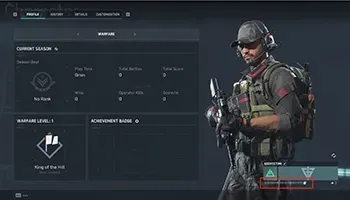
Launch Delta Force through Steam, then open the profile or settings menu (the gear icon) in the game. Your User ID is listed in the profile or account information section, usually as a string of numbers under your account name. Copy the number exactly as shown, without spaces.
Tips
- Check your User ID twice before paying; coins sent to another account cannot be pulled back.
- Make sure your account is a Steam Delta Force account, not a Garena one. The two are separate and each has its own top-up page.
- Pick an amount that fits what you need so you are not left with unused coins.
- Keep your invoice number until the coins show up in your account.
- If the coins have not arrived after a few minutes, check your transaction history, then contact support with your invoice number.
With the correct User ID, your Delta Coins are ready to complete your loadout for the next fight.
Why Top Up at ItemGame
- Automatic Process
- No Password Needed
- Local Payments
- Customer Support
How to find your User ID in the Steam version of Delta Force:
- Launch Delta Force through Steam and log in to the account you usually play on.
- On the game’s main screen, click the profile icon or the gear-shaped settings menu.
- Find the profile or account information section. Your User ID is shown as a string of numbers under your account name.
- Copy the number without spaces or extra characters.
- Paste the User ID into the field on the ItemGame top-up page, then check every digit again before paying.
Make sure the User ID comes from a Steam Delta Force account, not a Garena account. The two are separate, and coins that have already been sent cannot be moved between accounts.