






Tips

League of Legends is a 5v5 MOBA from Riot Games and one of the biggest competitive games in the world. You pick one Champion from a roster of hundreds, work with your team to control lanes and objectives, then destroy the enemy Nexus. Everything that affects power is earned through play, while cosmetics such as skins are bought with Riot Points (RP). This page is where you add RP to your League of Legends PC account.
Every item on this page is RP, in the following amounts:
The smallest amount (575 RP) covers a chroma but not a Standard skin, which costs 975 RP; mid-sized amounts suit Epic and Legendary tier skins, and the large amounts are for when you want several skins at once or an event pass. In the client, RP is used to buy Champion skins, chromas, emotes, icons, event passes, and Teamfight Tactics cosmetics such as Little Legends and arenas.
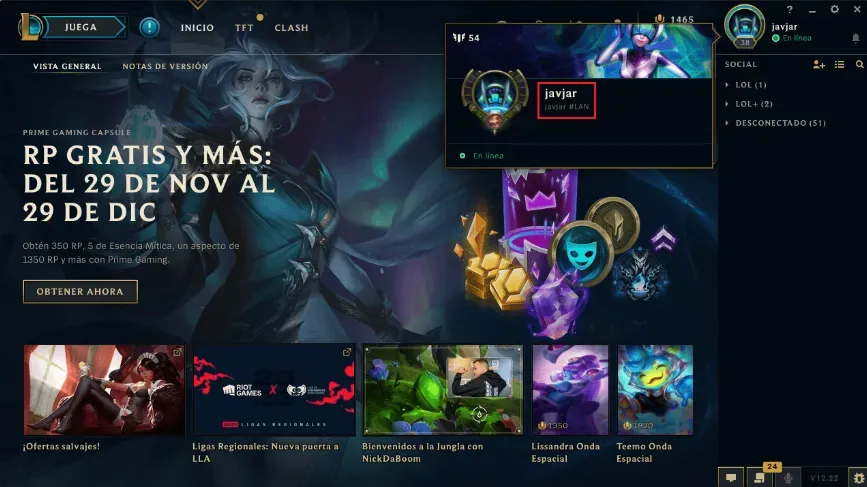
Open the League of Legends client on your PC, then hover over your profile picture in the top-right corner. Your Riot ID and tagline are shown in the format Name#Tagline. You can also see it in the Riot ID section of your Riot account page in a browser. Copy both parts in full; without the tagline your account cannot be identified, because many players can use the same name.
Once your RP is in, just pick your skin and head back to Summoner’s Rift.
Why Top Up at ItemGame
How to find your Riot ID for League of Legends PC:
Alternatively, open your Riot account page in a browser and look at the Riot ID section. The tagline must be included because many players can use the same name; only the combination of name and tagline is unique to your account.