Top Up FC Mobile FC Points Philippines (PH)
EA SPORTS FC Mobile for Philippines Accounts
This page is for FC Mobile accounts in the Philippines (PH) region. Items bought here cannot be delivered to accounts in other regions.
EA SPORTS FC Mobile, formerly FIFA Mobile, is Electronic Arts’ football game where you build an Ultimate Team from licensed players across world leagues. You can play Head to Head and VS Attack, join seasonal events and strengthen your squad through the transfer market and player packs. FC Points are the premium currency for packs and offers in the store.
What You Can Buy
Two item types are available:
- FC Points: 40, 100, 520, 1070, 2200, 5750 and 12000 FC POINTS, the premium currency for packs and store offers.
- Silver: 39, 99, 499, 999, 1999, 4999 and 9999 Silver.
Read the item name carefully when choosing so you do not mix up FC POINTS and Silver.
How to Top Up
- Choose FC POINTS or Silver and the amount.
- Enter your User ID (UID).
- Pay with one of the methods shown at checkout. The list depends on the store you shop in: in Indonesia you pay in rupiah with QRIS, e-wallets, bank virtual accounts or retail outlets, among others. In the Philippines the options include Maya and over-the-counter payment at partner banks, pawnshops and retail outlets.
- After the payment is confirmed, the order is sent automatically.
How to Find Your User ID
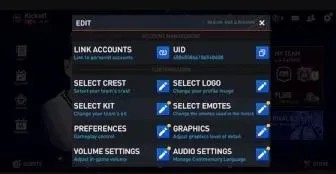
Open FC Mobile and tap the gear icon on the main screen. The settings page shows your UID with a copy button next to it. Copying is safer than typing because the UID is long.
Tips
- Make sure your account belongs to the Philippines region.
- Check the item name before paying.
Why Top Up at ItemGame
- Automatic Process
- No Password Needed
- Local Payments
- Customer Support
To find your FC Mobile User ID:
- Open EA SPORTS FC Mobile.
- Tap the settings (gear) icon on the main screen.
- Find your UID and tap the copy button next to it.
- Paste it into the User ID field on ItemGame.