Top Up Sausage Man Candies with User ID
About Sausage Man
Sausage Man is a battle royale with sausage characters, silly physics and odd vehicles such as UFOs and animal mounts. It looks relaxed, but the shooting is still competitive, which makes it a good pick if you want a lighter battle royale that still takes skill. Candies are the premium currency for the Season Pass, supply boxes, costumes and weapon skins.
What You Can Buy
Candy packs of 61, 186, 318, 1378, 2118, 3548 and 7108 Candies. There are no special conditions on any pack, so pick the size that fits your shopping plan in the in-game store.
How to Top Up Sausage Man on ItemGame
- Enter your User ID (character ID).
- Choose a Candies amount.
- Pick a payment method and pay.
- After the payment is confirmed, the Candies are added automatically. Check your balance in the game.
How to Find Your User ID
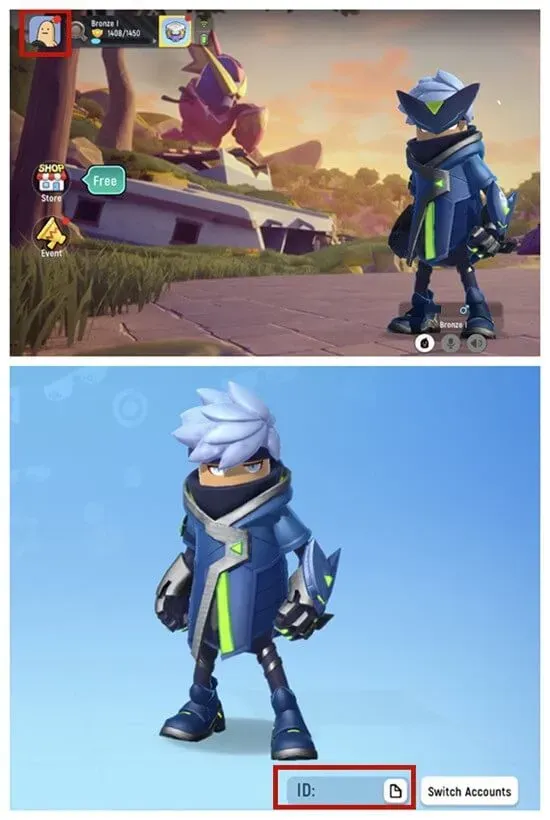
Open Sausage Man and tap your avatar in the top-left corner of the main screen. Your character ID is shown right under your sausage character.
Tips
- Copy the ID rather than typing it.
- If you are buying the Season Pass, check its Candy price first.
- Keep your invoice number until the Candies arrive.
Why Top Up at ItemGame
- Automatic processing: most orders are delivered within minutes of payment confirmation
- Prices in your local currency, with the final total shown before you pay
- Pay with the QR, e-wallet and bank options available in your country, through licensed payment partners
- Only the account details the order form asks for, never your game password
- Support over WhatsApp and email with your invoice number
To find your Sausage Man User ID:
- Open Sausage Man and go to the main screen.
- Tap your avatar in the top-left corner.
- Copy the character ID shown under your sausage character.
- Paste it into the User ID field on ItemGame.
Sausage Man FAQ
1 Where do I find my Sausage Man User ID?
Tap your avatar in the top-left corner of the main screen. The character ID is shown under your character.
2 How long does it take for the Candies to arrive?
Usually a few minutes after the payment is confirmed. Orders are processed automatically, 24 hours a day.
3 My Candies order has not arrived. What should I do?
Check the order status on your invoice page or in your order history. If it is paid but nothing has arrived, contact us at cs@itemgame.com or WhatsApp +62 877 7077 7770 with your invoice number.
4 What happens if I enter the wrong User ID?
The order is sent to the User ID you entered and cannot be pulled back once delivered, so double-check it before you pay.
5 Do I need to log in or share my password?
No. We only need your User ID. ItemGame never asks for your password or verification codes.
6 Which payment methods can I use?
The options follow your store region: local e-wallets, QR payments and bank or over-the-counter options available in your country. The full list appears on the payment page at checkout.