Top Up MU Origin 3 (SEA) Divine Diamonds
About MU Origin 3 (SEA)
MU Origin 3 is a mobile MMORPG from Webzen that continues the MU Online legacy: grinding, boss hunts, dungeons and the chase for rare equipment, rebuilt for mobile devices. The SEA version is for players in Southeast Asia. It suits fans of classic MMORPGs who enjoy long-term character progress and guild content. Divine Diamonds are the game’s premium currency, used in the in-game shop and for special offers. At ItemGame you only need your User ID, without logging in.
What You Can Buy
Divine Diamonds packs in these amounts:
- 70 Divine Diamonds
- 350 Divine Diamonds
- 1050 Divine Diamonds
- 2100 Divine Diamonds
- 3500 Divine Diamonds
- 7000 Divine Diamonds
- 10500 Divine Diamonds
- 14000 Divine Diamonds
- 21000 Divine Diamonds
Small packs cover occasional purchases; larger ones suit players who chase equipment and events. The Divine Diamonds go straight to the character that matches the User ID you enter.
How to Top Up MU Origin 3 (SEA) at ItemGame
- Enter your character’s User ID (the Role ID).
- Choose a Divine Diamonds pack.
- Pick a payment method and pay.
- Once the payment is confirmed, the Divine Diamonds are delivered automatically. Check your balance in the game.
How to Find Your User ID
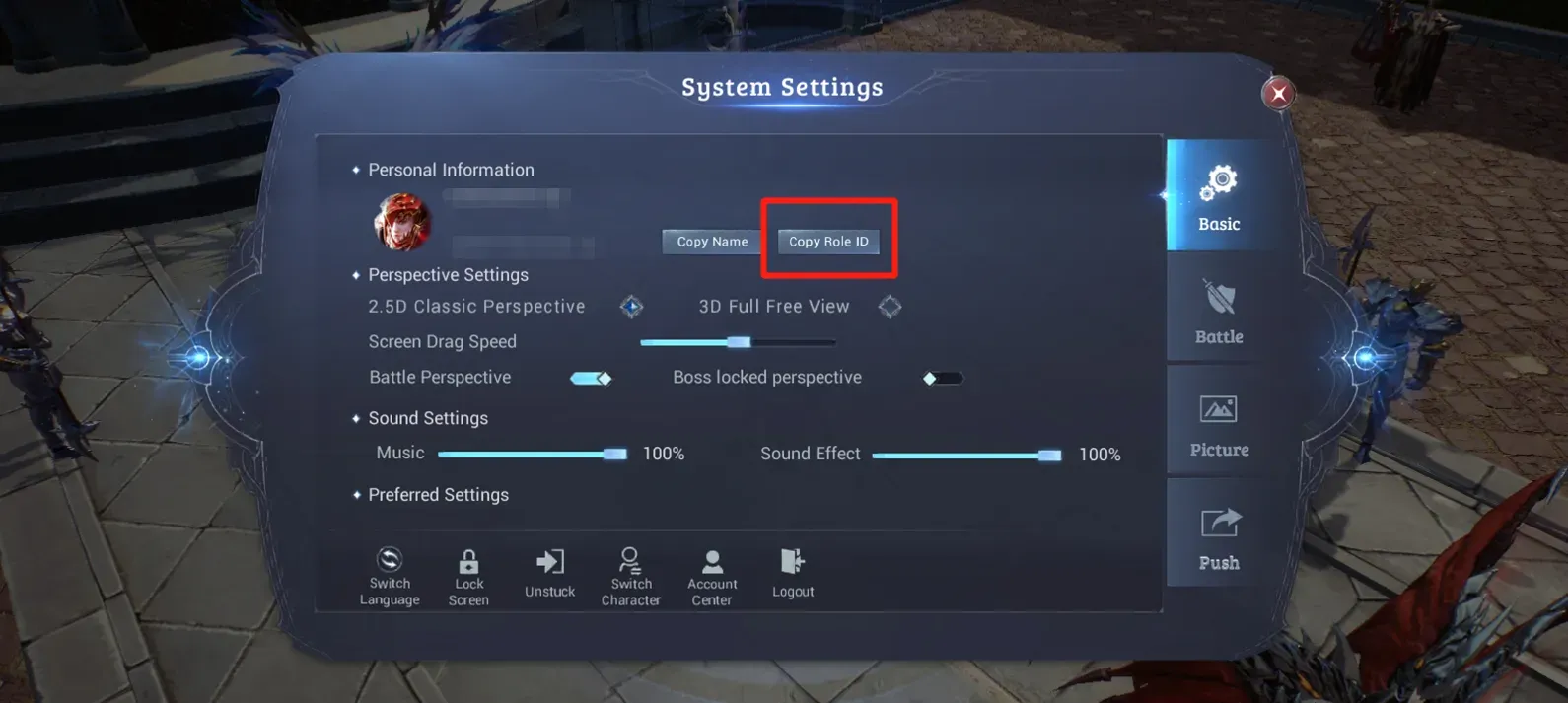
- Open MU Origin 3 (SEA) and log in to the character you want to top up.
- Tap the menu icon, then the settings icon.
- Tap the Copy Role ID button to copy your ID.
- Paste it into the User ID field at ItemGame.
Tips
- This page is for the SEA version of MU Origin 3 only.
- Use the in-game copy button so you do not mistype the ID, and make sure no extra space is pasted.
- If you have several characters, use the Role ID of the one you want to top up.
- Keep your invoice number until the Divine Diamonds show in your account.
Why Top Up at ItemGame
- Automatic Process
- No Password Needed
- Local Payments
- Customer Support
How to find your MU Origin 3 (SEA) User ID (Role ID):
- Open MU Origin 3 (SEA) and log in to the character you want to top up.
- Tap the menu icon on the main screen, then the settings icon.
- Tap Copy Role ID to copy the ID automatically.
- Paste it into the User ID field at ItemGame and check that no extra space was copied.
Divine Diamonds sent to another character cannot be moved, so check the ID before you pay.