Top Up NBA INFINITE IC with User ID and Server
About NBA INFINITE
NBA INFINITE is an officially licensed NBA basketball game for mobile with real-time PvP. You collect and train NBA stars, then play quick 3v3 games on outdoor courts or more strategic full 5v5 matches. This page is for players who want to add IC quickly using their User ID and server, without logging in.
What You Can Buy
IC is the premium currency of NBA INFINITE, used for player packs, cosmetics and offers in the in-game shop. Available amounts: 100, 200, 500, 1000, 2000, 3000, 5000 and 10000 IC. Choose the amount that matches what you plan to buy in the game.
How to Top Up NBA INFINITE on ItemGame
- Enter your User ID and choose your server.
- Choose the item you want.
- Pay with the local e-wallets, QR and bank options available in your country.
- After the payment is confirmed, the order is processed automatically and delivered to your account.
How to Find Your User ID and server
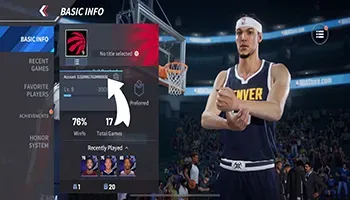
Open NBA INFINITE, go to the main menu and tap your profile avatar in the top-left corner. Your User ID is under your nickname. Your server name is on the same profile page or on the server selection screen when you log in. Choose the same server on ItemGame.
Tips
- A wrong server is the most common reason IC does not arrive, so check it in the game before paying.
- Check your User ID twice; IC delivered to another account cannot be moved back.
- Choose an amount that fits the player pack you want.
- Keep your invoice number until the item shows up in your account.
- If nothing has arrived after a few minutes, check your invoice page, then contact support with your invoice number.
Why Top Up at ItemGame
- Automatic Process
- No Password Needed
- Local Payments
- Customer Support
To find your NBA INFINITE User ID and server:
- Open the game and go to the main menu.
- Tap your profile avatar in the top-left corner.
- Copy the User ID under your nickname.
- Choose the matching server on ItemGame.