Top Up Punishing: Gray Raven Rainbow Cards
About Punishing: Gray Raven
Punishing: Gray Raven (PGR) is a 3D action RPG from Kuro Games with fast, responsive hack-and-slash combat. In a post-apocalyptic world taken over by the Punishing virus, you are the Commander of the Gray Raven unit leading Constructs to reclaim Earth. The Signal Orb system, dodging into Matrix and a mature story have earned it a loyal following. You need Rainbow Cards to recruit new Constructs and weapons.
What You Can Buy
Every item is Rainbow Cards in amounts of 5, 28, 34, 59, 71, 119, 299 and 600. Each amount comes in two versions, (Android) and (iOS), so pick the one that matches the device your account plays on. In the game, Rainbow Cards are exchanged for Black Cards, used for Research to get new Constructs and weapons, and for coatings and other shop items.
How to Top Up Punishing: Gray Raven on ItemGame
- Enter your Role ID and choose your server (Asia-Pacific, Europe or North America).
- Choose the item you want.
- Pay with the local e-wallets, QR and bank options available in your country.
- After the payment is confirmed, the order is processed automatically and delivered to your account.
How to Find Your Role ID
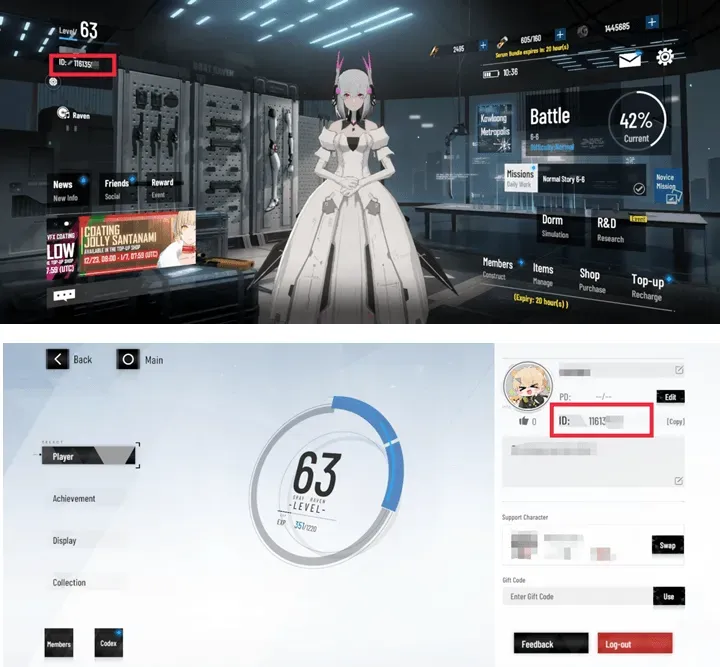
Open Punishing: Gray Raven and tap your Commander level or name in the top-left corner of the main screen. On the profile page, your Role ID is the eight-digit number under your nickname and level. Copy it into the Role ID field on ItemGame and choose the same server as your account.
Tips
- Match your Role ID, server and device version (Android or iOS) twice before paying; items delivered to another account cannot be moved back.
- For a specific Construct banner, work out how many Black Cards you need first.
- If nothing has appeared, close and reopen the game and check your mailbox.
- Keep your invoice number until the item shows up in your account.
- If nothing has arrived after a few minutes, check your invoice page, then contact support with your invoice number.
Why Top Up at ItemGame
- Automatic Process
- No Password Needed
- Local Payments
- Customer Support
To find your Punishing: Gray Raven Role ID:
- Open the game.
- Tap your Commander level or name in the top-left corner.
- Copy the eight-digit Role ID under your nickname.
- Paste it into ItemGame and choose your server.