Top Up Pokémon UNITE Aeos Gems with Support ID
About Pokémon UNITE
Pokémon UNITE is a 5v5 team battle game from TiMi Studio Group and The Pokémon Company. You play as Pokémon such as Pikachu, Charizard or Zacian, defeat wild Pokémon and score Aeos Energy in the opposing team’s goal zones in quick matches. This page is for players who want to top up Aeos Gems with just their Support ID.
What You Can Buy
Aeos Gems are the premium currency of Pokémon UNITE, used for Unite Licenses, Holowear (Pokémon costumes), the Battle Pass and other shop items. Available packs: 60 AeosGems, 245 + 5 Bonus, 490 + 35 Bonus, 1220 + 130 Bonus, 2450 + 290 Bonus, 3050 + 450 Bonus and 6000 + 1100 Bonus AeosGems. The bonus is extra Aeos Gems delivered with the main pack.
How to Top Up Pokémon UNITE on ItemGame
- Enter your Support ID (not your Trainer ID).
- Choose the item you want.
- Pay with the local e-wallets, QR and bank options available in your country.
- After the payment is confirmed, the order is processed automatically and delivered to your account.
How to Find Your Support ID
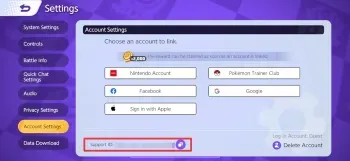
Open Pokémon UNITE and go to the main menu. Open Settings, scroll down to Account Settings, and find your Support ID there. Copy the number and paste it into the Support ID field on ItemGame.
Tips
- Use your Support ID, not your Trainer ID or player name; the Support ID is only shown in Account Settings.
- Check it twice; Aeos Gems delivered to another account cannot be moved back.
- Pick a pack that covers your target, such as one Holowear or the Battle Pass.
- Keep your invoice number until the item shows up in your account.
- If nothing has arrived after a few minutes, check your invoice page, then contact support with your invoice number.
Why Top Up at ItemGame
- Automatic Process
- No Password Needed
- Local Payments
- Customer Support
To find your Pokémon UNITE Support ID:
- Open the game and go to the main menu.
- Open Settings.
- Scroll down to Account Settings.
- Copy the Support ID into ItemGame.