Top Up Ludo Club Cash and Coin Packs with User ID
About Ludo Club
Ludo Club is a mobile version of the classic Ludo board game that you can play online with friends, family or other players. It has classic and quick modes, chat and emoji, and many board and dice themes. There are two currencies: Coins, used as the stake in each match, and Cash, the premium currency for buying large amounts of Coins or cosmetic items.
What You Can Buy
- Cash Pack: 120, 250, 700, 3200, 10800 and 20000 Cash.
- Coin Pack: 30000, 150000, 1000000, 2500000, 10000000 and 50000000 Coins.
Pick a Coin Pack if you need more to keep playing at higher-stake tables, or a Cash Pack for board themes, dice and other premium items.
How to Top Up Ludo Club on ItemGame
- Enter the User ID of your Ludo Club account.
- Choose the item you want.
- Pay with the local e-wallets, QR and bank options available in your country.
- After the payment is confirmed, the order is processed automatically and delivered to your account.
How to Find Your User ID
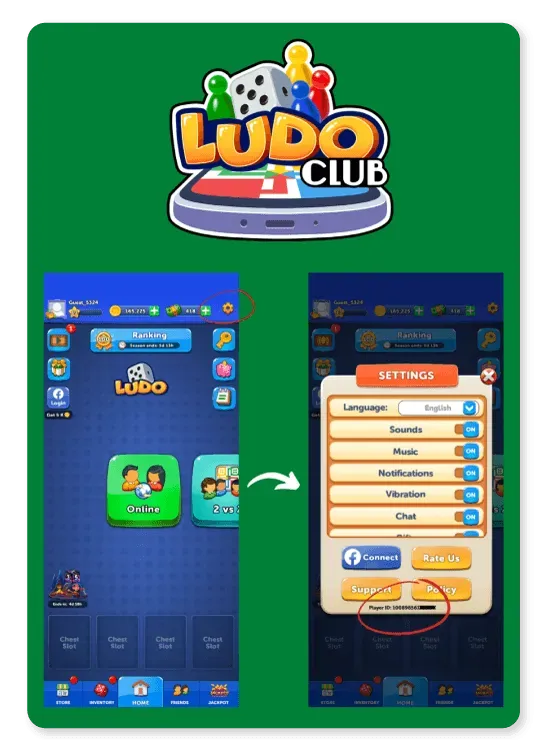
Open Ludo Club and go to the main screen. Tap the Settings (gear) icon in the top-right corner; your player ID is shown at the bottom of the settings window. Copy the number into the User ID field on ItemGame.
Tips
- Check your User ID twice before paying; Cash or Coins delivered to another account cannot be moved back.
- Choose the right type: Coin Packs to play, Cash Packs for premium items.
- Match the Coin Pack to how many matches you plan to play at your favourite table.
- Keep your invoice number until the item shows up in your account.
- If nothing has arrived after a few minutes, check your invoice page, then contact support with your invoice number.
Why Top Up at ItemGame
- Automatic Process
- No Password Needed
- Local Payments
- Customer Support
To find your Ludo Club User ID:
- Open the game and go to the main screen.
- Tap the Settings (gear) icon in the top-right corner.
- Find the player ID at the bottom of the window.
- Copy it into ItemGame.