Top Up StarMaker (Global) with Your SID
About StarMaker
StarMaker is a social karaoke app with a huge song catalogue, from local hits to international ones. You can sing solo, duet with other users or join a Party Room to sing and chat live, complete with vocal effects and video filters. To send gifts to your favorite singers and unlock premium features, you need to top up the app’s virtual currency, and this page lets you do that with just your SID.
What You Can Buy
This page offers virtual currency top-ups for StarMaker Global accounts. The active amounts are listed at the top of the page, from small packs for trying out gifts to large packs for users who regularly support singers or hosts in Party Rooms. In the app, this balance is used to buy and send virtual gifts and to unlock the premium features or items available.
How to Top Up StarMaker on ItemGame
- Choose the amount you want from the item list.
- Enter your SID (StarMaker ID) in the field provided. The SID is a string of numbers, not your nickname.
- Choose a payment method, such as QRIS, e-wallets (DANA, OVO, ShopeePay, LinkAja), a bank virtual account or cash at Alfamart or Indomaret, then complete the payment.
- Once the payment is confirmed, the balance is sent to your account automatically. Check it on your profile page or in the in-app wallet.
How to Find Your SID
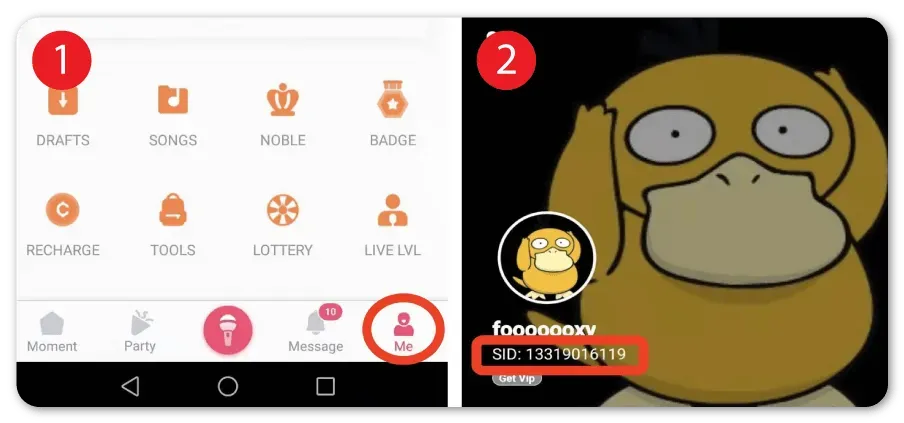
Open the StarMaker app and tap the Me tab at the bottom of the screen. Tap your profile name to open the profile details page; your SID appears as a string of numbers under your nickname. Copy it and paste it into the SID field on ItemGame. Make sure you copy the SID and not your nickname, since a nickname can be changed while the SID stays the same.
Tips
- Double-check your SID before paying. Balance sent to another account can’t be pulled back.
- Pick an amount that matches how you use the app. If you often send gifts in Party Rooms, a mid-sized pack is usually more practical.
- Keep your invoice number as proof of purchase until the balance shows up in your account.
- If your balance hasn’t changed, close and reopen the app and check again before contacting support.
- Never share your password or account verification codes with anyone.
Once your balance arrives, you’re ready to get back on stage and support your favorite singers.
Why Top Up at ItemGame
- Automatic Process
- No Password Needed
- Local Payments
- Customer Support
How to find your SID (StarMaker ID):
- Open the StarMaker app and log in to the account you want to top up.
- Tap the Me tab at the bottom of the screen.
- Tap your profile name to open your profile details page.
- Look under your nickname. The string of numbers there is your SID.
- Copy the number, paste it into the SID field on the ItemGame page and check it again before paying.
Use the numeric SID, not your nickname, because a nickname can be changed at any time while the SID is permanent and unique to each account. If you have more than one account, make sure the one you’re logged in to is the account you want to top up.