Top Up Arena Breakout: Infinite Bonds (PC)
Arena Breakout: Infinite, a Realistic Extraction Shooter for PC
Arena Breakout: Infinite is the PC version of Arena Breakout, an extraction shooter with a realistic approach. You drop into a conflict zone, gather loot, and then have to make it out alive (exfil) for the gear you carry to become yours. This page is for PC players who want to add premium currency to their account using their User ID, without logging in to the game account.
What You Can Buy
The premium currency in Arena Breakout: Infinite is Bonds. Bonds are used for things like buying the Battle Pass, activating gear insurance, and purchasing supply packs and cosmetics in the game. The available packages are shown in the product list on this page, and each one displays the amount of Bonds that will be added to your account.
Keep in mind that this page is only for Arena Breakout: Infinite (PC). For the mobile version, use the separate Arena Breakout product page so your top-up goes to the right game.
How to Top Up Arena Breakout: Infinite on ItemGame
- Choose the Bonds package you want from the product list.
- Enter your Arena Breakout: Infinite User ID in the field provided.
- Choose a payment method, such as QRIS, e-wallets, bank virtual account, or cash at Alfamart or Indomaret.
- Complete the payment. Once it is confirmed, the Bonds are processed to your account automatically.
How to Find Your User ID
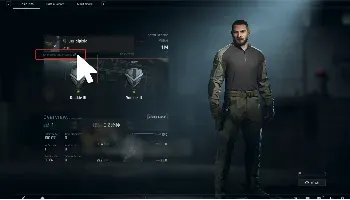
- Launch Arena Breakout: Infinite on your PC and go to the main menu.
- Open the profile menu by clicking your character name or avatar.
- Your User ID is shown below your character name on the profile page.
- Copy the User ID and paste it into the User ID field on ItemGame.
If the menus look different after a game update, look for the profile or account settings section; the ID is usually near the account name.
Tips
- Make sure you use the User ID of your Arena Breakout: Infinite PC account, not the ID of a mobile account.
- Double-check your User ID before paying. Bonds sent to another account cannot be reversed.
- Pick a package that fits what you need, for example one Battle Pass or a few rounds of gear insurance.
- Keep your invoice number until the Bonds show up in your account balance.
- If the Bonds have not arrived after the payment is confirmed, check your transaction history on ItemGame, then contact customer support with your invoice number.
Since the system runs automatically 24/7, you can top up Bonds any time before your next raid.
Why Top Up at ItemGame
- Automatic Process
- No Password Needed
- Local Payments
- Customer Support
How to find your Arena Breakout: Infinite User ID:
- Launch Arena Breakout: Infinite on your PC and wait until you reach the main menu.
- Click your character name or avatar to open the profile page.
- Your User ID is shown below your character name. Copy the number carefully.
- Paste the User ID into the User ID field on the ItemGame top-up page.
Make sure the ID belongs to your PC account, not your Arena Breakout mobile account. Bonds sent to another account cannot be transferred.