Top Up ASTRA: Knights of Veda Rubies
About ASTRA: Knights of Veda
ASTRA: Knights of Veda is a dark fantasy action RPG with detailed 2D visuals and real-time combat. You collect Knights of different classes and elements, build your team, then take on story content, dungeons and other modes. It suits RPG fans who enjoy collecting characters and skill-based fights. Rubies are ASTRA’s premium currency, mainly used to summon characters and weapons and for other in-game needs. On ItemGame, you only need your User ID and server to top up Rubies.
What You Can Buy
ASTRA: Knights of Veda on ItemGame comes as Rubies packs in several amounts:
- 60 Rubies
- 300 Rubies
- 980 Rubies
- 1980 Rubies
- 3280 Rubies
- 6480 Rubies
Pick a small pack for the occasional purchase, or a bigger one if you are saving up for a character banner you have your eye on. Rubies are sent straight to the account that matches the User ID and server you choose.
How to Top Up ASTRA: Knights of Veda on ItemGame
- Enter your ASTRA User ID in the field provided.
- Select your Server from the dropdown: KR / JP / TW, SEA / OCE, AMERICAS or EUROPE. Players in Indonesia are usually on the SEA / OCE server, but make sure it matches your account.
- Choose a Rubies pack, then pick a payment method and complete the payment as instructed.
- Once the payment is confirmed, the Rubies are processed automatically and added to your account.
How to Find Your User ID
- Open ASTRA: Knights of Veda and log in to the game.
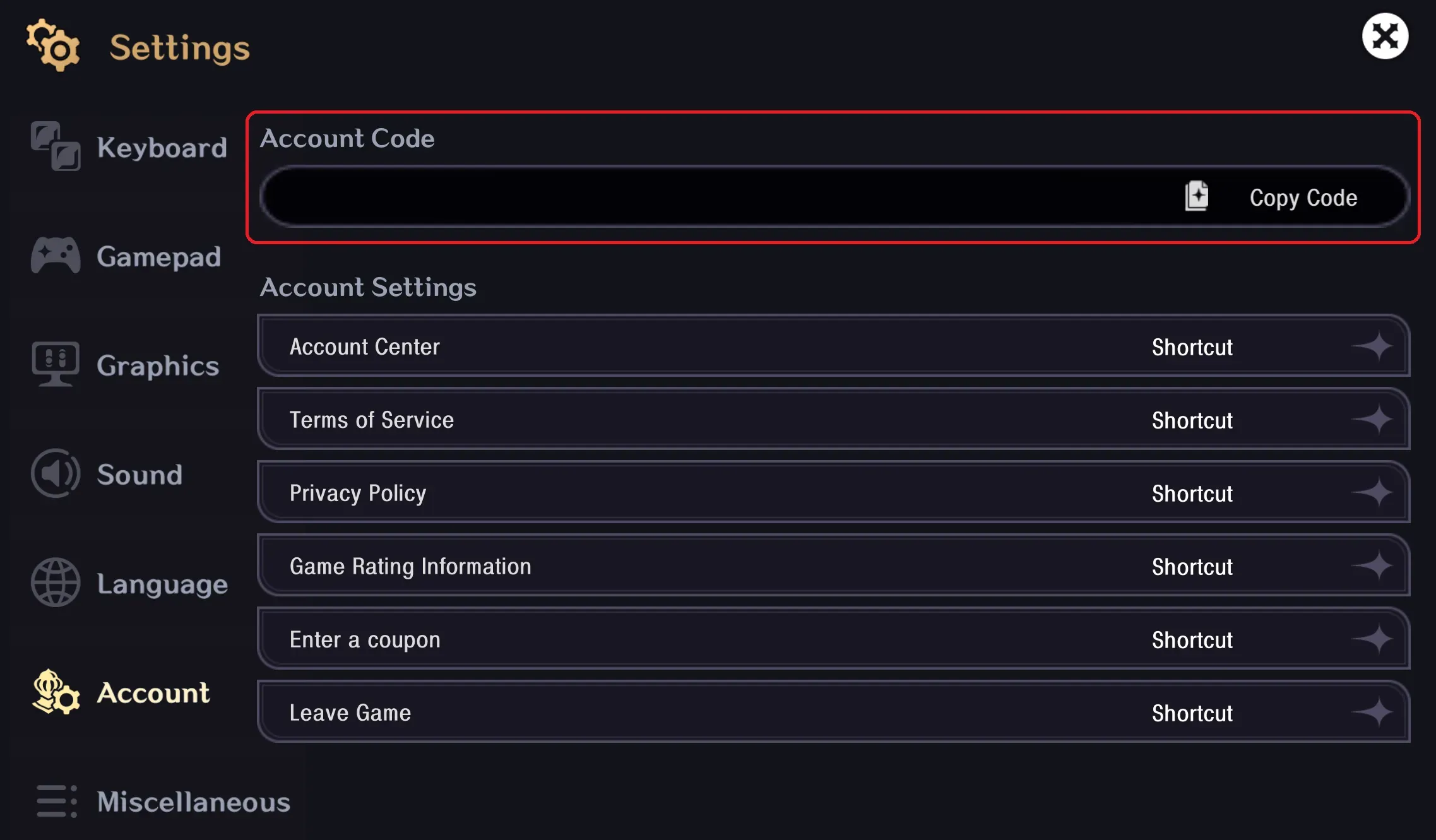
- Open the Settings menu.
- Go to the Account tab.
- Your User ID is shown on that page. Copy the number into the User ID field on ItemGame, then select the server your account is on.
Tips
- Double-check your User ID and server before paying. Rubies that have been sent to another account or server cannot be pulled back.
- Pick an amount that fits your plan, for example by working out how many Rubies you need for the banner you want to pull on.
- If you have characters on more than one server, make sure you select the server of the character you want to top up.
- Keep your invoice number until the Rubies show up in your account.
- If the Rubies have not arrived after a few minutes, check the invoice page, then contact ItemGame support with your invoice number.
Top-ups are processed automatically 24/7, so you can get back to your adventure without a long wait.
Why Top Up at ItemGame
- Automatic Process
- No Password Needed
- Local Payments
- Customer Support
How to find your ASTRA: Knights of Veda User ID to top up on ItemGame:
- Open the ASTRA: Knights of Veda app and log in until you are in the game.
- Open the Settings menu from the main screen.
- Go to the Account tab.
- Your User ID is shown on that page. Copy the number into the User ID field on ItemGame.
- Select the server that matches your account from the dropdown: KR / JP / TW, SEA / OCE, AMERICAS or EUROPE.
Make sure you enter the User ID without spaces or extra characters and that the server you choose is the one your character plays on. Rubies sent to the wrong account or server cannot be moved, so check again before you continue to payment.