Top Up Tom and Jerry: Chase Diamonds
About Tom and Jerry: Chase
Tom and Jerry: Chase is a casual 1v4 asymmetric game from NetEase Games based on the classic cat-and-mouse chase. One player is the cat, whose job is to catch all the mice, while the other four play as mice working together to steal cheese and push it into the hole before time runs out. Iconic characters such as Tom, Jerry, Butch and Tuffy each come with their own skills, in a classic cartoon-style look. The game uses Diamonds to buy characters and skins, and this page is where you top them up.
What You Can Buy
Every item on this page is Diamonds, in amounts of 60, 180, 300, 600, 1200, 1800, 3000 and 6000 Diamonds. Small amounts are good for topping up a shortfall or buying a simple skin, mid-range amounts for a new character, and large amounts if you want to join lucky draws or collect several skins at once. In the game, Diamonds are used to buy characters from both the cat and mouse factions, exclusive skins, and to take part in lucky draw events for rare items.
How to Top Up Tom and Jerry: Chase on ItemGame
- Choose the Diamonds amount you want from the item list.
- Enter your account’s User ID in the field provided. The User ID is a string of numbers, not your player name.
- Select the Server from the dropdown. The option currently available is Asia Server, which matches the version played in Indonesia.
- Choose a payment method, such as QRIS, e-wallets, bank virtual account or cash at Alfamart or Indomaret, then complete the payment. The Diamonds are sent automatically once the payment is confirmed.
How to Find Your User ID
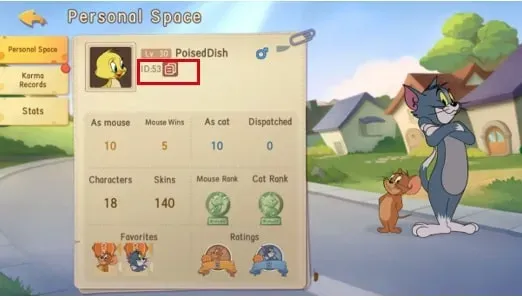
Open Tom and Jerry: Chase, tap the avatar in the top left corner of the main screen and go to My Page. In the Personal Career section, tap the QR code icon in the top left corner; your game ID appears in the top left of that screen. Copy the number and paste it into the User ID field on ItemGame.
Tips
- Check your User ID twice before paying. Diamonds sent to another account can’t be pulled back.
- Pick an amount that fits your goal. Check how many Diamonds the character or skin you want costs in the in-game shop first.
- Keep your invoice number as proof of purchase until the Diamonds show up in your account.
- If they haven’t appeared, close and reopen the game and check your in-game mailbox before contacting support.
- Never share your account password or verification code with anyone.
Once the Diamonds are in, just pick your favourite character and start the chase.
Why Top Up at ItemGame
- Automatic Process
- No Password Needed
- Local Payments
- Customer Support
How to find your Tom and Jerry: Chase User ID:
- Open Tom and Jerry: Chase and log in to the account you want to top up with Diamonds.
- On the main screen, tap the avatar in the top left corner, then go to My Page.
- In the Personal Career section, tap the QR code icon in the top left corner.
- Your game ID, a string of numbers, appears in the top left of that screen. Copy the number.
- Paste it into the User ID field on the ItemGame page, select Asia Server, then check it again before paying.
Use the numeric ID, not your player name, because names can be shared by several players while IDs are always unique. If you have more than one account, make sure the one you’re logged in to is the account you want to top up.