
Top Up Pixel Gun 3D Gems, Coins and Keys
About Pixel Gun 3D
Pixel Gun 3D is a mobile FPS with blocky, Minecraft-style graphics and fast shooting action. You can collect hundreds of weapons, customise your character and fight in modes such as Team Fight and Deathmatch. It suits players who like a relaxed but competitive shooter. On this page you can top up Pixel Gun 3D’s currencies with just your User ID.
What You Can Buy
- Gems: 90+10, 150+25, 300+75, 600+200 and 1500+700 Gems, for weapons and premium items.
- Coins: 50+5, 150+15, 250+25, 500+100, 1000+300 and 2500+1000 Coins.
- Keys: 50+5, 150+15, 250+25, 500+100, 1000+300 and 2500+1000 Keys.
- Battle Pass: Pixel Pass tickets in packs of 60+6, 180+20, 300+50, 600+150, 1200+550 and 3000+1500.
- Bundles: Basic Set, Advanced Set, Expert Set and Winner Set.
The number after the plus is the bonus delivered with the main amount.
How to Top Up Pixel Gun 3D on ItemGame
- Enter the User ID of your Pixel Gun 3D account.
- Choose the item you want.
- Pay with the local e-wallets, QR and bank options available in your country.
- After the payment is confirmed, the order is processed automatically and delivered to your account.
How to Find Your User ID
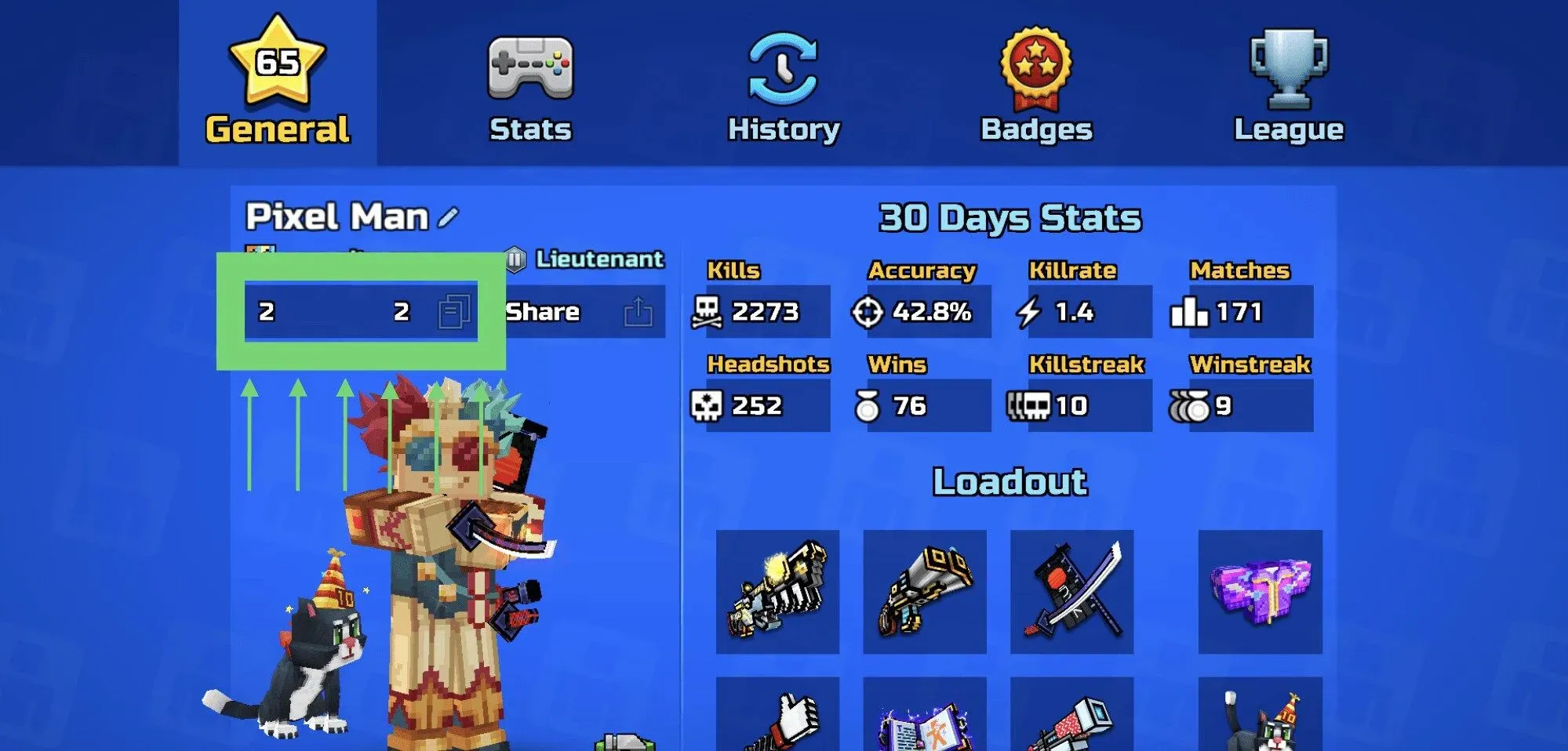
Open Pixel Gun 3D, go to the main menu and open your account profile. Your ID number is shown under the nickname you chose. Copy the number and paste it into the User ID field on ItemGame.
Tips
- Choose the right currency (Gems, Coins or Keys), because each has its own use in the game.
- Check your User ID twice; items delivered to another account cannot be moved back.
- For Pixel Pass tickets, make sure a season pass is running so you can use them right away.
- Keep your invoice number until the item shows up in your account.
- If nothing has arrived after a few minutes, check your invoice page, then contact support with your invoice number.
Why Top Up at ItemGame
- Automatic Process
- No Password Needed
- Local Payments
- Customer Support
To find your Pixel Gun 3D User ID:
- Open the game and go to the main menu.
- Open your account profile.
- Copy the ID number under your nickname.
- Paste it into ItemGame.
Pixel Gun 3D FAQ
1 What is the difference between Gems, Coins and Keys?
They are separate in-game currencies with different uses. Gems are the main premium currency for weapons and premium items; Coins and Keys are used in other parts of the game.
2 How long does it take for the items to arrive?
Usually a few minutes after the payment is confirmed. Orders are processed automatically, 24 hours a day.
3 My items order has not arrived. What should I do?
Check the order status on your invoice page or in your order history. If it is paid but nothing has arrived, contact us at cs@itemgame.com or WhatsApp +62 877 7077 7770 with your invoice number.
4 What happens if I enter the wrong User ID?
The order is sent to the User ID you entered and cannot be pulled back once delivered, so double-check it before you pay.
5 Do I need to log in or share my password?
No. We only need your User ID. ItemGame never asks for your password or verification codes.
6 Which payment methods can I use?
The options follow your store region: local e-wallets, QR payments and bank or over-the-counter options available in your country. The full list appears on the payment page at checkout.