Top Up Legends of Runeterra Coins
About Legends of Runeterra
Legends of Runeterra (LoR) is a strategy card game from Riot Games set in the League of Legends universe. You build a deck from Champions and followers from regions such as Demacia, Noxus, and Ionia, then manage your mana and the timing of your attacks to take down the opponent’s Nexus. The Path of Champions mode offers a roguelike PvE adventure you can play casually on mobile or PC. LoR uses Coins for buying cosmetics and growing your collection faster, and this page is where you add them to your account.
What You Can Buy
All items on this page are Coins, in amounts of 475 Coins, 1000 Coins, 2050 Coins, 3650 Coins, 5350 Coins, and 11000 Coins. Smaller amounts suit a single cosmetic item or a small bundle, while larger amounts are for players who want to complete their collection in one go. In the game, Coins are used to buy game boards, Guardians, card backs, store bundles, and items that help expand your card collection and your Path of Champions content.
How to Top Up Legends of Runeterra on ItemGame
- Choose the Coins amount you want from the item list.
- Enter your full Riot ID in the field provided, including the tagline after the hash sign, for example YourName#1234.
- Choose a payment method, such as QRIS, e-wallets, bank virtual account, or cash at Alfamart or Indomaret, then complete the payment.
- Once the payment is confirmed, the Coins are sent to your account automatically. Check your balance at the top of the LoR main screen.
How to Find Your Riot ID
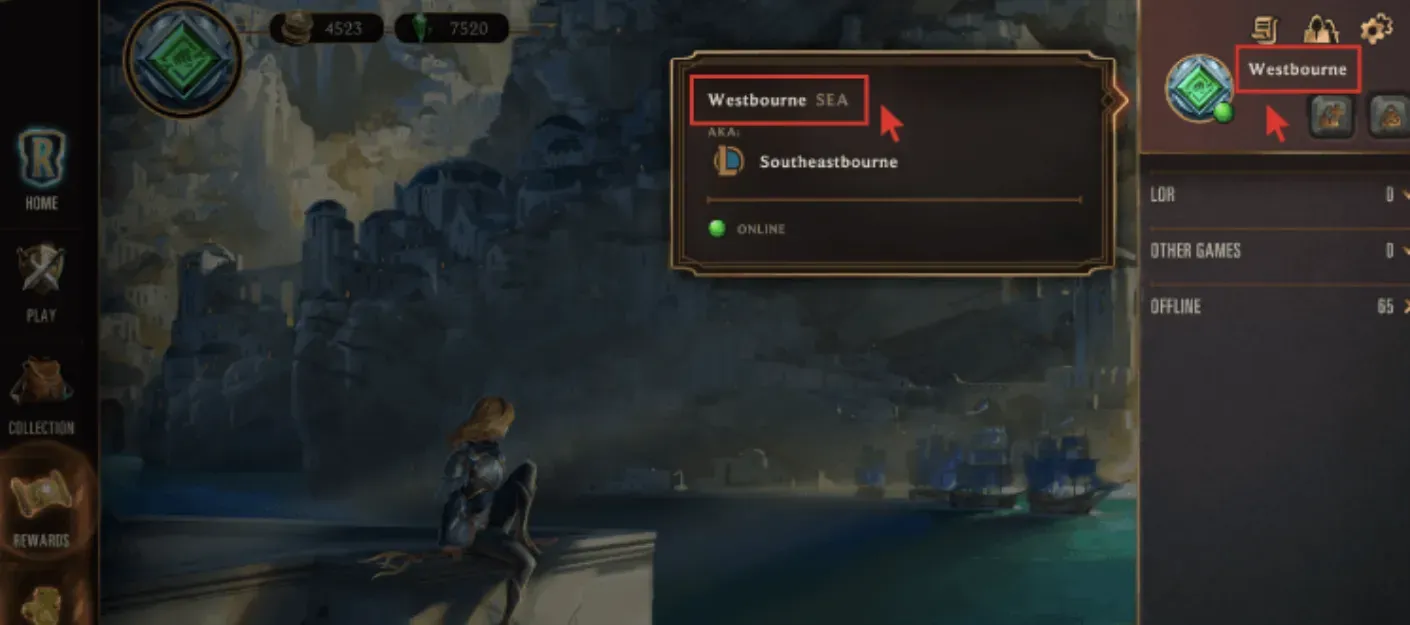
Open Legends of Runeterra, then hover over or tap your profile picture in the top-right corner of the main screen. Your Riot ID and tagline are shown in the Name#Tagline format. The same Riot ID is used for other Riot games too, so you can also check it on your Riot account page in a browser. Copy the name and tagline in full, because without the tagline the account cannot be identified.
Tips
- Double-check your Riot ID and tagline before paying. Coins sent to another account cannot be reversed.
- Make sure there are no extra spaces around the hash sign when you type your Riot ID.
- Choose an amount that matches your goal. Check the price of the bundle or cosmetic you want in the in-game store first.
- Keep your invoice number as proof of the transaction until the Coins show up in your account.
- If your Coins have not increased, restart the game and check again before contacting customer support.
Once the Coins arrive, it is time to complete your deck and get back to the duel table.
Why Top Up at ItemGame
- Automatic Process
- No Password Needed
- Local Payments
- Customer Support
How to find your Riot ID for Legends of Runeterra:
- Open Legends of Runeterra and log in to the account you want to top up with Coins.
- Hover over or tap your profile picture in the top-right corner of the main screen.
- Your Riot ID is shown in the Name#Tagline format, for example YourName#1234.
- Copy the name and tagline in full, then paste them into the Riot ID field on the ItemGame page.
- Make sure there are no extra spaces around the hash sign, and check it again before paying.
The same Riot ID works across all Riot games, so you can also check it on your Riot account page in a browser. The tagline is required because many players can use the same name.