
Top Up Growtopia Gems and Royal Grow Pass
About Growtopia
Growtopia is a 2D multiplayer sandbox now run by Ubisoft. There is no single goal: you build worlds, plant and splice seeds to create new items, trade with other players or just hang out in a friend’s world. The economy is driven by players, so items and Gems matter a lot.
What You Can Buy
- Gems packs: Chest O’ Gems, Gem Fountain, It’s Rainin’ Gems, Gem Bounty and Gem Abundance. Bigger packs give more Gems, which buy World Locks, packs and gear in the in-game store.
- Royal Grow Pass for rewards across the season.
- 1 - Year Subscription Token for long-term subscription benefits.
Check what each item contains in the game before buying.
How to Top Up Growtopia on ItemGame
- Choose a Gems pack, the Royal Grow Pass or the Subscription Token.
- Enter your Grow ID.
- Pick a payment method and pay.
- After the payment is confirmed, the item is sent automatically.
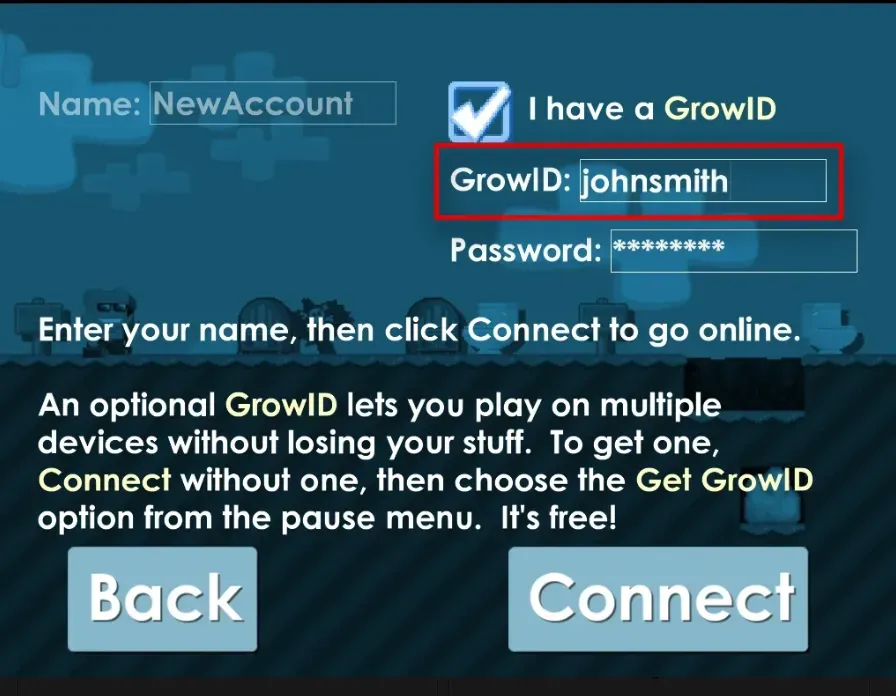
How to Find Your Grow ID
Your Grow ID is the account name you log in with, and it is also the name shown above your character in a world. Type it exactly, including upper and lower case letters.
Tips
- One wrong letter in the Grow ID sends the order to a different player.
- Keep your invoice number until the Gems arrive.
Why Top Up at ItemGame
- Automatic processing: most orders are delivered within minutes of payment confirmation
- Prices in your local currency, with the final total shown before you pay
- Pay with the QR, e-wallet and bank options available in your country, through licensed payment partners
- Only the account details the order form asks for, never your game password
- Support over WhatsApp and email with your invoice number
To check your Grow ID:
- Open Growtopia and look at the account name on the login screen, or
- Enter any world and read the name shown above your character.
- Type it on ItemGame exactly as written, including capital letters.
- Check it once more before paying.
Growtopia FAQ
1 What is a Grow ID and where do I see it?
It is the account name you log in with, also shown as your character's name. You can see it on the login screen or above your character in a world.
2 How long does it take for the Gems to arrive?
Usually a few minutes after the payment is confirmed. Orders are processed automatically, 24 hours a day.
3 My Gems order has not arrived. What should I do?
Check the order status on your invoice page or in your order history. If it is paid but nothing has arrived, contact us at cs@itemgame.com or WhatsApp +62 877 7077 7770 with your invoice number.
4 What happens if I enter the wrong Grow ID?
The order is sent to the Grow ID you entered and cannot be pulled back once delivered, so double-check it before you pay.
5 Do I need to log in or share my password?
No. We only need your Grow ID. ItemGame never asks for your password or verification codes.
6 Which payment methods can I use?
The options follow your store region: local e-wallets, QR payments and bank or over-the-counter options available in your country. The full list appears on the payment page at checkout.