
Top Up Arena of Valor (AOV) Vouchers with ID
About Arena of Valor
Arena of Valor (AOV) is the 5v5 MOBA from Garena and Tencent, fought on the Antaris Battlefield with a large hero roster that includes collaboration characters from other franchises. Responsive controls, clean visuals and a competitive ranked system give it a different feel from other MOBAs. Its premium currency is called Vouchers.
What You Can Buy
Voucher packs of 40, 90, 230, 470, 950, 1430 and 2390 Vouchers. In the game, Vouchers buy heroes directly, skins of every tier, the Valor Pass and entries to draw events.
How to Top Up AOV on ItemGame
- Choose a Voucher amount.
- Enter your User ID, the number shown in the game settings, not your nickname.
- Pick a payment method and pay.
- After the payment is confirmed, the Vouchers are sent automatically. Check the balance at the top of the lobby.
How to Find Your User ID
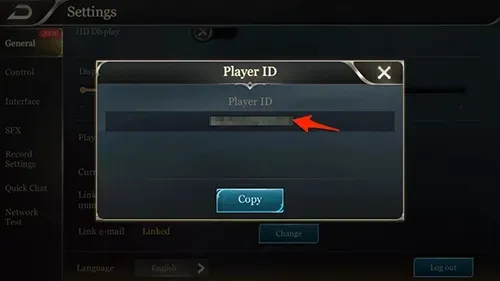
Tap the gear icon in the top-right corner of the lobby. On the General tab you will see your account ID with a copy button next to it.
Tips
- Use the copy button; the ID is long.
- Check the Voucher price of the skin you want first.
- Keep your invoice number until the Vouchers arrive.
Why Top Up at ItemGame
- Automatic processing: most orders are delivered within minutes of payment confirmation
- Prices in your local currency, with the final total shown before you pay
- Pay with the QR, e-wallet and bank options available in your country, through licensed payment partners
- Only the account details the order form asks for, never your game password
- Support over WhatsApp and email with your invoice number
To find your AOV User ID:
- Open Arena of Valor and go to the lobby.
- Tap the settings (gear) icon in the top-right corner.
- Open the General tab and tap the copy button next to your ID.
- Paste it into the User ID field on ItemGame.
Arena of Valor FAQ
1 Where do I find my Arena of Valor User ID?
Tap the gear icon in the top-right corner of the lobby and open the General tab. Your account ID is shown there with a copy button.
2 How long does it take for the Vouchers to arrive?
Usually a few minutes after the payment is confirmed. Orders are processed automatically, 24 hours a day.
3 My Vouchers order has not arrived. What should I do?
Check the order status on your invoice page or in your order history. If it is paid but nothing has arrived, contact us at cs@itemgame.com or WhatsApp +62 877 7077 7770 with your invoice number.
4 What happens if I enter the wrong User ID?
The order is sent to the User ID you entered and cannot be pulled back once delivered, so double-check it before you pay.
5 Do I need to log in or share my password?
No. We only need your User ID. ItemGame never asks for your password or verification codes.
6 Which payment methods can I use?
Options include QRIS, e-wallets such as DANA, OVO, ShopeePay and LinkAja, bank virtual accounts, and cash payment at Alfamart or Indomaret. The full list appears on the payment page at checkout.