
Top Up Super SUS Goldstar with User ID
About Super SUS
Super SUS is an online social deduction game set in space. You play as Spacecrew completing missions while hidden Impostors sabotage and eliminate the crew. Voice chat, voting and a range of special roles make every round different.
What You Can Buy
- Goldstar: 100, 310, 520, 1060, 2180 and 5600 Goldstar, used for costumes, accessories, pets and other cosmetics.
- Weekly Card and Monthly Card: Goldstar and rewards spread over the card’s duration.
- SUPER PASS and SUPER PASS BUNDLE: tiered rewards across the season.
- Super VIP Card: membership benefits.
Check each package’s contents in the game before buying.
How to Top Up Super SUS on ItemGame
- Choose Goldstar, a card or a pass.
- Enter your User ID.
- Pick a payment method and pay.
- After the payment is confirmed, the item is sent automatically.
How to Find Your User ID
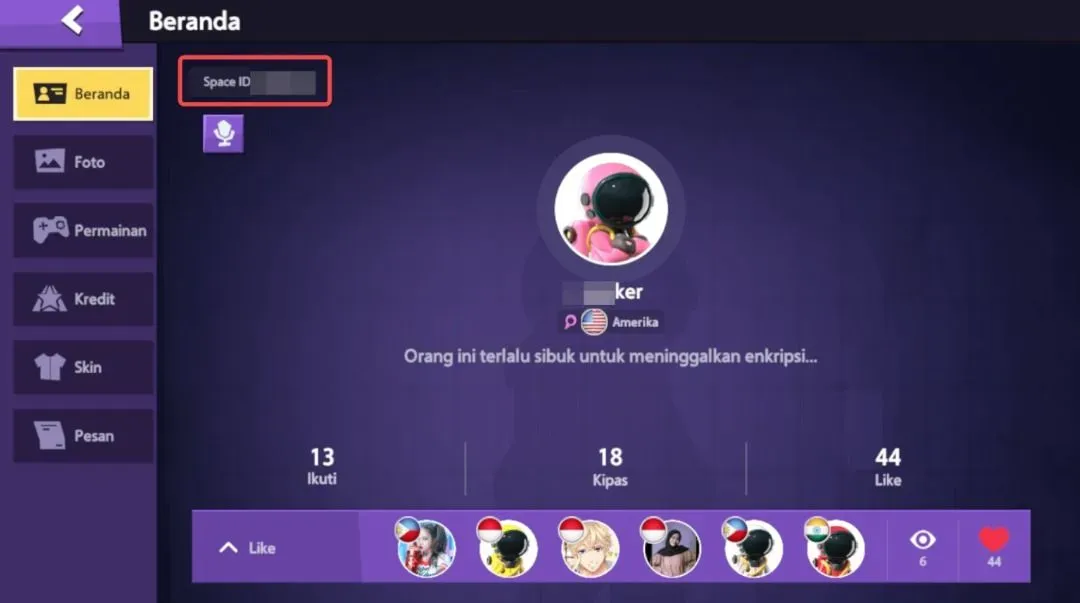
Tap the profile icon in the top-left corner of the main screen. Your User ID is the number shown on your profile page near your name.
Tips
- Copy the ID exactly as shown.
- For Weekly and Monthly Cards, log in daily to claim the rewards.
Why Top Up at ItemGame
- Automatic Process
- No Password Needed
- Local Payments
- Customer Support
To find your Super SUS User ID:
- Open Super SUS and go to the main screen.
- Tap the profile icon in the top-left corner.
- Copy the number shown near your name.
- Paste it into the User ID field on ItemGame.
Super SUS FAQ
1 Where do I find my Super SUS User ID?
Tap the profile icon in the top-left corner of the main screen. The numeric User ID is shown on your profile page.
2 How long does it take for the Goldstar to arrive?
Usually a few minutes after the payment is confirmed. Orders are processed automatically, 24 hours a day.
3 My Goldstar order has not arrived. What should I do?
Check the order status on your invoice page or in your order history. If it is paid but nothing has arrived, contact us at cs@itemgame.com or WhatsApp +62 877 7077 7770 with your invoice number.
4 What happens if I enter the wrong User ID?
The order is sent to the User ID you entered and cannot be pulled back once delivered, so double-check it before you pay.
5 Do I need to log in or share my password?
No. We only need your User ID. ItemGame never asks for your password or verification codes.
6 Which payment methods can I use?
The options follow your store region: local e-wallets, QR payments and bank or over-the-counter options available in your country. The full list appears on the payment page at checkout.