Top Up Land of Empires Coins by User ID
About Land of Empires
Land of Empires is a mobile strategy RPG that combines kingdom building, tactical battles and world-map exploration. You start from a small town, develop facilities such as barracks and research centres, train troops, recruit heroes, then form alliances to compete with other players. The bigger your kingdom grows, the more speed-ups and resources you need to stay ahead on the map. This page is for Land of Empires players who want to add Coins to their account quickly.
What You Can Buy
The items on offer are Coins packs, from 500 Coins up to 10,000 + 500 Coins:
- 500 Coins
- 1,000 + 50 Coins
- 2,000 + 100 Coins
- 5,000 + 250 Coins
- 10,000 + 500 Coins
On the 1,000 pack and above, the number after the plus sign is bonus Coins that are added to your account as well, so larger packs give you a more noticeable extra.
Coins are used for premium needs in the game, such as speeding up construction, research and troop training, buying resources, and recruiting heroes. If building timers often hold you back, a mid-sized pack is usually enough for several speed-ups; for recruiting heroes or bigger purchases, a large pack is more practical.
How to Top Up Land of Empires on ItemGame
- Choose the Coins pack you want from the item list.
- Enter your Land of Empires User ID in the field provided.
- Choose a payment method, such as QRIS, e-wallets, bank virtual account or retail outlets (Alfamart/Indomaret).
- Complete the payment. Coins are sent to your account automatically once the payment is confirmed.
How to Find Your User ID
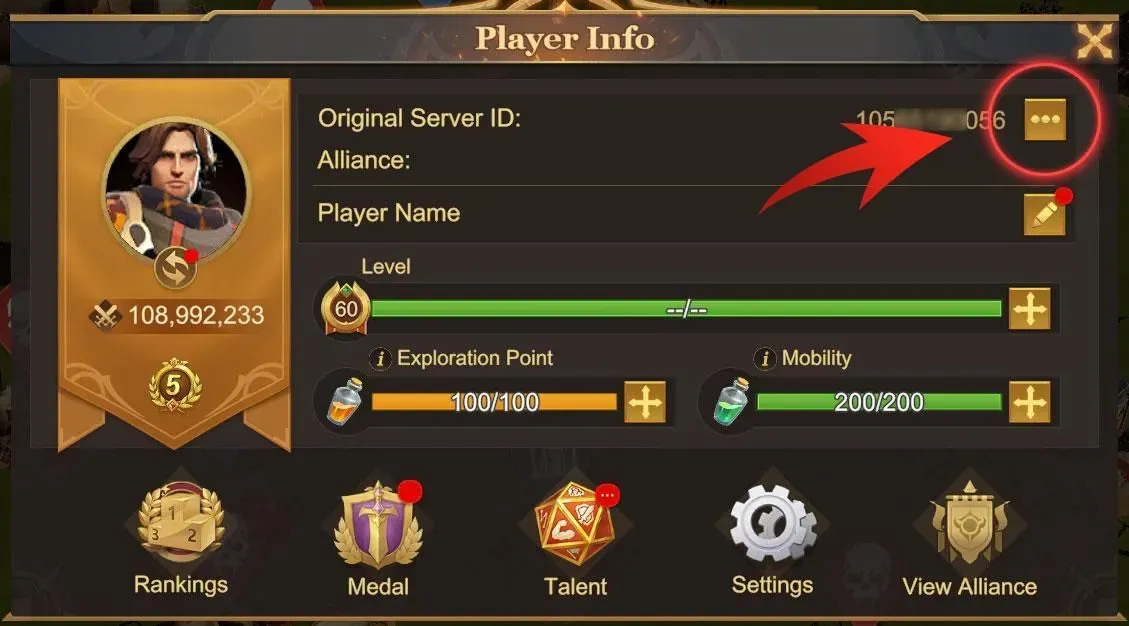
Log in to the game, then tap your profile avatar icon on the main menu. Your User ID is clearly shown on the profile page, usually as a string of numbers. Copy the number exactly as shown and paste it into the User ID field on the ItemGame page.
Tips
- Check your User ID twice before paying; Coins sent to another account cannot be pulled back.
- Make sure you copy the numeric User ID, not your governor name or alliance name.
- Pick an amount that fits what you need so you are not left with an unused balance.
- Keep your invoice number until the Coins show up in your account.
- If nothing has arrived after a few minutes, check your transaction history, then contact support with your invoice number.
Once your Coins are in, you can speed up your buildings and strengthen your army for the next war.
Why Top Up at ItemGame
- Automatic Process
- No Password Needed
- Local Payments
- Customer Support
How to find your User ID in Land of Empires:
- Open Land of Empires and log in to the account you want to top up.
- On the main menu, tap your profile avatar icon.
- On the profile page, your User ID is shown as a string of numbers. Copy or note it down carefully.
- Paste the User ID into the field on the ItemGame top-up page.
- Check every digit again before paying, because Coins are sent to the User ID you entered and cannot be moved to another account.
Make sure you enter the numeric User ID, not your governor name or alliance name, because the field only accepts the account ID.