Top Up Heroic Uncle Kim Gems and Demon Coins
About Heroic Uncle Kim
Heroic Uncle Kim is an idle action RPG that follows Uncle Kim, an ordinary man who suddenly gains powers and has to fight waves of monsters. Your character keeps fighting and collecting resources even while the game is closed, while you focus on weapons, skills, costumes and relics to build the strongest setup. The game uses several premium currencies for faster progress and gacha, and this page is where you top them up.
What You Can Buy
- Gems with Master Keys: 220 Gems + 20 Master Keys, 1200 Gems + 90 Master Keys, 2400 Gems + 150 Master Keys, and larger packs of 8500, 16000 and 36000 Gems with more Master Keys.
- Demon Coins with Master Keys: 95 Demon Coins + 150 Master Keys and 150 Demon Coins + 300 Master Keys.
- Dragon Orbs: 950 Dragon Orbs, a separate currency.
- Ads Pass 30 Days + 240 Gems: a month of pass benefits plus extra Gems.
Every bonus is written in the item name, so you know exactly what you receive.
How to Top Up Heroic Uncle Kim on ItemGame
- Enter the User ID of your Heroic Uncle Kim account.
- Choose the item you want.
- Pay with the local e-wallets, QR and bank options available in your country.
- After the payment is confirmed, the order is processed automatically and delivered to your account.
How to Find Your User ID
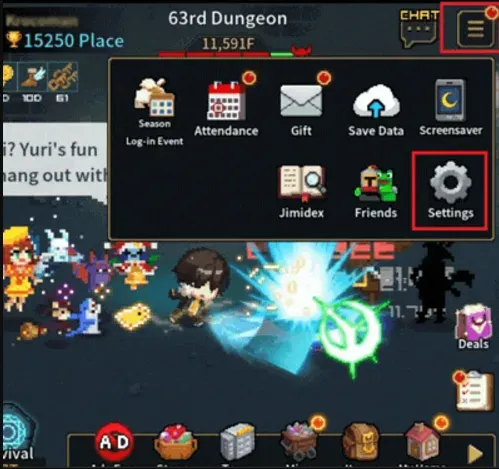
Open Heroic Uncle Kim and tap Menu in the top-right corner. Choose Settings (the gear icon) and look at the bottom-left corner of the settings screen; your User ID is shown there. Copy it carefully and paste it into the User ID field on ItemGame.
Tips
- Check your User ID twice before paying; items delivered to another account cannot be moved back.
- Read item names carefully: Gems, Demon Coins, Dragon Orbs and the Ads Pass are different things.
- If an item has not appeared, close and reopen the game and check your mailbox first.
- Keep your invoice number until the item shows up in your account.
- If nothing has arrived after a few minutes, check your invoice page, then contact support with your invoice number.
Why Top Up at ItemGame
- Automatic Process
- No Password Needed
- Local Payments
- Customer Support
To find your Heroic Uncle Kim User ID:
- Open the game.
- Tap Menu in the top-right corner.
- Choose Settings (gear icon).
- Copy the User ID from the bottom-left corner into ItemGame.