






News

Identity V is a 1v4 asymmetrical survival horror game from NetEase Games with a distinctive gothic art style. Four Survivors must work together to decode Cipher Machines and open the exit gate, while one Hunter tries to catch them before they escape. Every character has unique abilities, so playing as the hunter and as the hunted feel very different. This page is for Identity V players who want to add Echoes to their account quickly.
Identity V’s premium currency is Echoes. Echoes are mainly used to buy new characters, costumes, accessories and other cosmetic items in the in-game store, including seasonal offers. The available Echoes amounts are shown in the item list on this page; pick the one closest to what you need so you are not left with an unused balance.
If you are after a specific costume or character, check how many Echoes it costs in the game first, then choose a pack that covers it. For small purchases such as accessories, a small pack is usually enough to cover the difference.
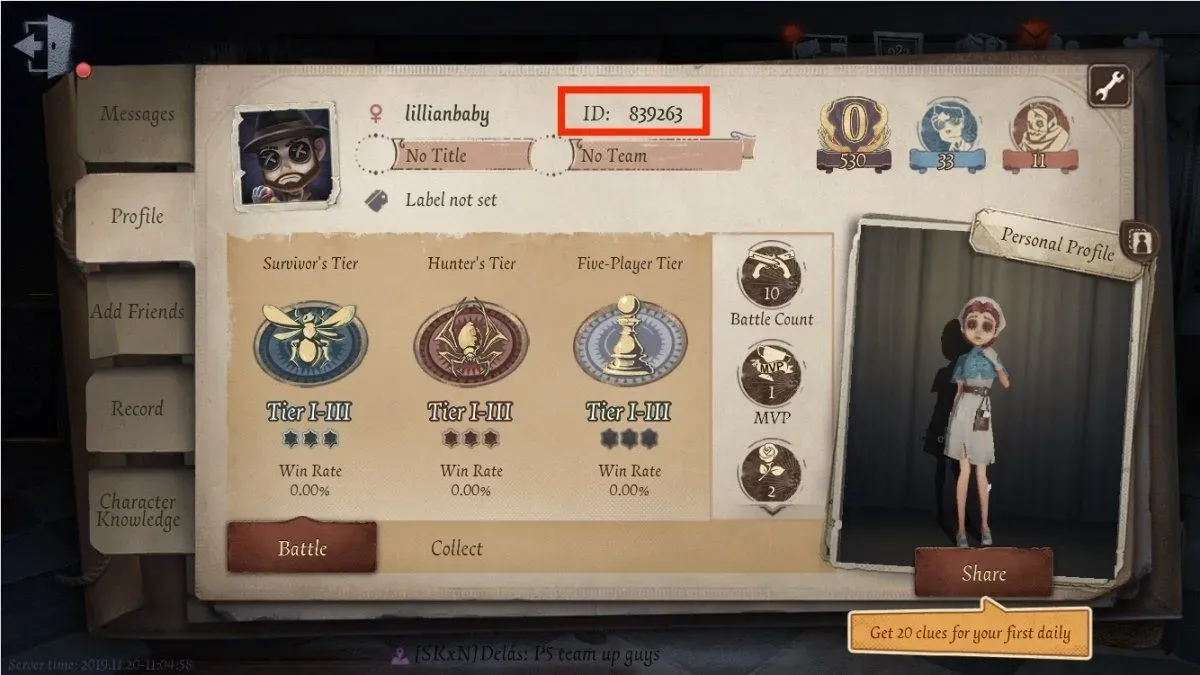
Log in to the game, then tap the friends button in the top-right corner. Open the Profile tab; the string of numbers shown there is your User ID. Copy the number exactly as shown and paste it into the User ID field on the ItemGame page.
Once your Echoes are in, you can go shopping in the store right away and head back to Oletus Manor with a fresh look.
Why Top Up at ItemGame
How to find your User ID in Identity V:
Check your User ID and Server again before paying, because Echoes are sent according to the details you entered and cannot be moved to another account.