







Free Fire MAX logo

Free Fire MAX

About Free Fire MAX

Free Fire MAX is the version of Garena’s Free Fire with higher-resolution graphics, richer effects and smoother animation, while the fast battle royale gameplay stays the same. Thanks to Firelink, MAX and regular Free Fire use the same account, so your Player ID, Diamonds and items are shared between both. You can top up here with just your Player ID.

What You Can Buy

Diamonds are used for the Booyah Pass, characters, pets, weapon skins, costume bundles and spin events. Packs go from 5, 10, 12 and 20 Diamonds up to 100 to 500 Diamonds, and on to 1000, 2000, 4000, 7290, 36500 and 73100 Diamonds.

Memberships available:

  • Member Mingguan (weekly) and Member Bulanan (monthly), with Diamonds up front and daily Diamonds while active.
  • Level Up Pass for Level 6, 10, 15, 20, 25 and 30.
  • BP Card, linked to the Booyah Pass.

How to Top Up Free Fire MAX on ItemGame

  1. Choose Diamonds or a membership.
  2. Enter your Player ID.
  3. Pick a payment method and pay.
  4. Once confirmed, the order goes to your account automatically.

How to Find Your Player ID

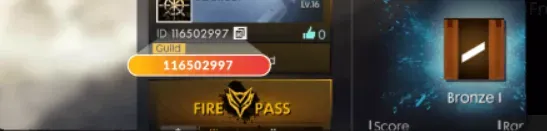
Tap your avatar or profile banner in the top-left corner of the lobby. The Player ID is shown under your nickname and is the same one you use in regular Free Fire.

Tips

  • Diamonds you buy here can be used in both Free Fire and Free Fire MAX.
  • Double-check your Player ID before paying.
  • Keep your invoice number until the Diamonds appear.

Why Top Up at ItemGame

  • Automatic processing: most orders are delivered within minutes of payment confirmation
  • Prices in your local currency, with the final total shown before you pay
  • Pay with the QR, e-wallet and bank options available in your country, through licensed payment partners
  • Only the account details the order form asks for, never your game password
  • Support over WhatsApp and email with your invoice number

Order Form Free Fire MAX

1 Enter Account Data

Required

You can find this in your in-game profile. Double-check it before ordering. Make sure the data you entered is correct.

2 Select Item

Required
3 Payment Method Required

4 Contact Information

Required

Your invoice and receipt will be sent to this email

Optional

Total Payment

Item -
Payment Method -
Price IDR 0
Admin Fee IDR 0
Total Payment IDR 0

More Mobile Game top ups

Articles about Free Fire MAX