









Mobile Legends logo

MLBB Top Up: Mobile Legends Diamonds via User ID

About Mobile Legends

Mobile Legends: Bang Bang (MLBB) is the 5v5 MOBA from Moonton that a huge share of Indonesian players open every day, whether for a few casual matches with friends or a serious climb to Mythic. Matches are short and the game runs smoothly on most phones. Diamonds are its premium currency, used for skins, heroes, Starlight and in-game draw events. On ItemGame you can top up Diamonds and MLBB passes with just your User ID and Zone ID, without logging in.

What You Can Buy

  • Diamonds: from 5 Diamonds up to tens of thousands. Most packages already include a bonus, for example 10 Diamonds (9 + 1 Bonus) or 222 Diamonds (200 + 22 Bonus). The number in the item name is the total you receive.
  • First Top-Up: 100, 300, 500 and 1000 Diamonds split 50/50 between base and bonus. The bonus only applies if your account has not claimed first recharge at that amount before.
  • Weekly Pass: Weekly Diamond Pass (x1 to x5), which pays out Diamonds daily while active, and the Weekly Elite Bundle.
  • Monthly Pass: Monthly Epic Bundle.
  • Battle Pass: Twilight Pass for the premium reward track of the current season.

How to Top Up Mobile Legends on ItemGame

  1. Enter your User ID and Zone ID.
  2. Choose Diamonds, a First Top-Up package, a pass or the Twilight Pass.
  3. Pick a payment method and complete the payment.
  4. Once the payment is confirmed, the order is processed automatically. Check your balance in the game.

How to Find Your User ID and Zone ID

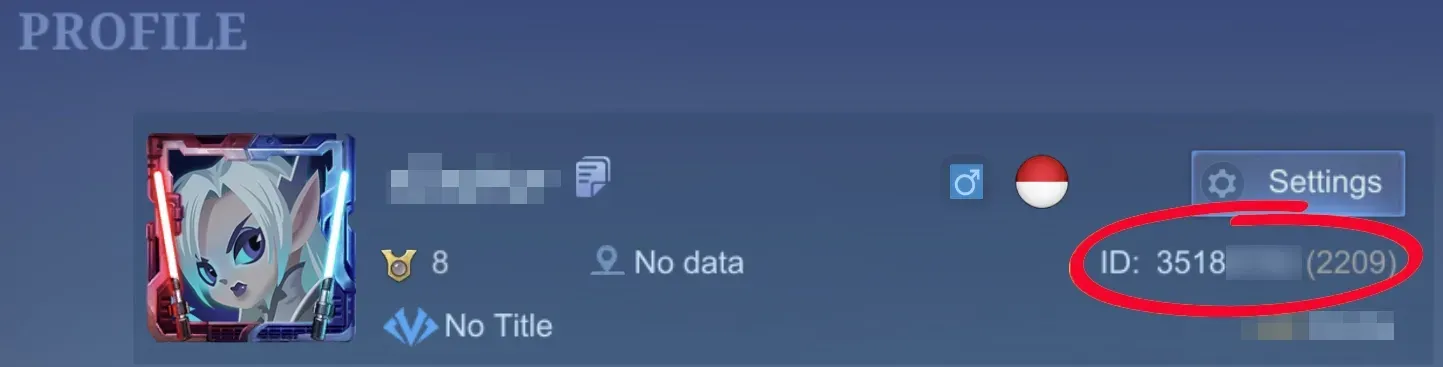
Open MLBB and tap your avatar in the top-left corner of the lobby. Under your nickname you will see numbers like 12345678 (1234). The first number is your User ID and the number in brackets is your Zone ID.

Tips

  • Check both IDs before paying. Diamonds sent to another account cannot be moved back.
  • If you are saving for a specific skin, work out how many Diamonds it needs first.
  • Keep your invoice number until the Diamonds show up in your account.

Why Top Up at ItemGame

  • Automatic Process
  • No Password Needed
  • Local Payments
  • Customer Support

Order Form Mobile Legends

1 Enter Account Data

Required
Required

You can find this in your in-game profile. Double-check it before ordering.

2 Select Item

Required

Mobile Legends price list for the Indonesia store (IDR).

3 Payment Method Required

4 Contact Information

Required

Your invoice and receipt will be sent to this email

Optional

Total Payment

Item -
Payment Method -
Price IDR 0
Admin Fee IDR 0
Total Payment IDR 0

Buyer reviews

  • Pi***a Verified buyer

    Very satisfied, Very fast delivery, As described, Friendly service, Recommended

  • jo***3 Verified buyer

    Very satisfied, Very fast delivery

  • uk***h Verified buyer

    As described, Very fast delivery, Very satisfied, Recommended, Friendly service

See more reviews (2)
  • gi***v Verified buyer

    Very fast delivery

  • gi***v Verified buyer

    Very fast delivery

More Mobile Game top ups

Articles about Mobile Legends