
About Magic Chess: Go Go
Magic Chess: Go Go is Moonton’s standalone auto-battler: you draft heroes, place them on the board and let them fight round by round. It is a separate app from the Magic Chess mode inside Mobile Legends, so it uses its own User ID and Zone ID. Diamonds are its premium currency, used for Little Commanders, board themes, effects and other cosmetics.
What You Can Buy
- Diamonds: from 5 Diamond up to 4830 Diamonds (4003 + 827 Bonus). Most packs include a bonus shown in the item name.
- First Top-Up: 100, 300, 500 and 1000 Diamonds with a 50/50 bonus split, for accounts that have not bought that amount before.
- Weekly Pass: Weekly Card, also in x2, x3, x4, x5 and x10.
- Bundle: Battle for Discounts, plus other packs such as Lukas’s Battle Bounty.
How to Top Up on ItemGame
- Choose Diamonds, a Weekly Card or a bundle.
- Enter your User ID and Zone ID from the Magic Chess: Go Go app.
- Pick a payment method and pay.
- Once the payment is confirmed, the order is processed automatically.
How to Find Your User ID and Zone ID
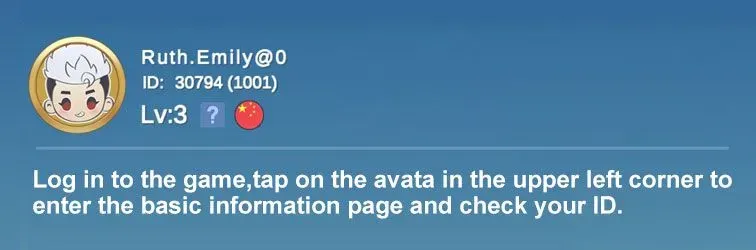
Tap your profile avatar in the top-left corner. Under your nickname you will see the User ID followed by the Zone ID in brackets, for example 12345678(1234).
Tips
- Use the IDs from Magic Chess: Go Go, not from Mobile Legends.
- First Top-Up bonuses only apply once per amount, so check your account first.
- Double-check both IDs before paying.
Why Top Up at ItemGame
- Automatic Process
- No Password Needed
- Local Payments
- Customer Support
To find your Magic Chess: Go Go IDs:
- Open Magic Chess: Go Go and go to the main menu.
- Tap your profile avatar in the top-left corner.
- Read the numbers under your nickname, for example 12345678(1234).
- Enter the number before the brackets as User ID and the number inside as Zone ID.
Magic Chess: Go Go FAQ
1 Is this the same as Magic Chess in Mobile Legends?
No. Magic Chess: Go Go is a separate app. Use the User ID and Zone ID from the Magic Chess: Go Go app, not from MLBB.
2 Where do I find my User ID and Zone ID?
Tap your profile avatar in the top-left corner. The User ID is shown with the Zone ID in brackets, such as 12345678(1234).
3 How long does it take for the Diamonds to arrive?
Usually a few minutes after the payment is confirmed. Orders are processed automatically, 24 hours a day.
4 My Diamonds order has not arrived. What should I do?
Check the order status on your invoice page or in your order history. If it is paid but nothing has arrived, contact us at cs@itemgame.com or WhatsApp +62 877 7077 7770 with your invoice number.
5 What happens if I enter the wrong User ID and Zone ID?
The order is sent to the User ID and Zone ID you entered and cannot be pulled back once delivered, so double-check it before you pay.
6 Do I need to log in or share my password?
No. We only need your User ID and Zone ID. ItemGame never asks for your password or verification codes.
7 Which payment methods can I use?
Options include QRIS, e-wallets such as DANA, OVO, ShopeePay and LinkAja, bank virtual accounts, and cash payment at Alfamart or Indomaret. The full list appears on the payment page at checkout.
Order Form Magic Chess: Go Go
Buyer reviews
- pr***a Verified buyer
Recommended