Top Up Legend of Mushroom: Rush Gems
About Legend of Mushroom: Rush
Legend of Mushroom: Rush is an idle mobile RPG starring cute mushroom characters that can evolve into tough adventurers. Progress keeps going even when the game is closed, while you choose a class, upgrade your gear, and conquer stages and other challenge modes, all in a light and cheerful visual style. This page is for Legend of Mushroom: Rush players who want to add Gems to their account quickly.
What You Can Buy
The available items are Gems + Bonus Items packages in various amounts, from 99 Gems + Bonus Items up to 59999 Gems + Bonus Items. Besides the Gems, each package comes with bonus items that are added to your account as well. Gems are the premium currency, generally used to pull new gear, buy items in the shop, and speed up your character’s progress.
Choose an amount that fits your goal: a small package to cover a shortfall in your balance, or a large package if you plan to spend a lot at once so the bonus items make more of a difference.
How to Top Up Legend of Mushroom: Rush on ItemGame
- Choose the Gems + Bonus Items package you want from the item list.
- Enter your account’s User ID, then select the Server your character is on from the dropdown list (the format is ID_ followed by the server number).
- Choose a payment method, such as QRIS, e-wallets, bank virtual account, or cash at Alfamart or Indomaret.
- Complete the payment. The Gems are sent to your account automatically once the payment is confirmed.
How to Find Your User ID and Server
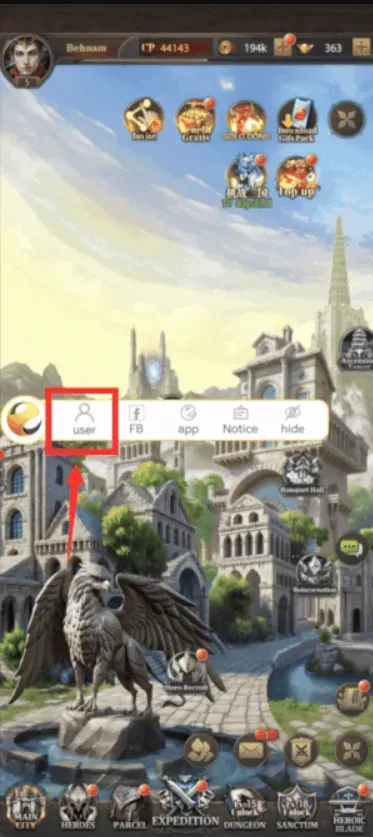
Log in to the game, then tap the floating button with the profile or menu icon in the top-left corner of the screen. Your UID is shown there together with the number of the server you are playing on. Copy the UID exactly as shown and select the server with the same number on ItemGame.
Tips
- Double-check your User ID and Server before paying; Gems sent to another account cannot be reversed.
- If you have characters on several servers, make sure you select the server of the character you want to top up.
- Choose an amount that fits your needs so no balance sits unused.
- Keep your invoice number until the Gems show up in your account.
- If they have not arrived after a few minutes, check your transaction history, then contact customer support with your invoice number.
Once the Gems arrive, you can pull new gear right away and take your mushroom to the next stage.
Why Top Up at ItemGame
- Automatic Process
- No Password Needed
- Local Payments
- Customer Support
How to find your User ID and Server in Legend of Mushroom: Rush:
- Open the game and log in to the character you want to top up.
- On the main screen, tap the floating button with the profile or menu icon in the top-left corner.
- On the page that opens, your UID is shown as a string of numbers. Copy it or note it down carefully.
- Also take note of the server number shown on the same page.
- On the ItemGame top-up page, enter the UID in the User ID field, then select the Server with the same number from the dropdown list.
If you play on more than one server, make sure the selected server is the one where the character you want to top up is, because delivery follows the details you enter.